Deep linking#
To make sharing and direct content links work, first complete the shared domain and CMS setup, then implement the URL-receiving route for either UIKit or SwiftUI. Both frameworks use Storyteller.shared.isStorytellerDeepLink(url:) and Storyteller.shared.openDeepLink(url:) after the app receives a URL.
Understanding Link Types#
iOS apps support two types of deep links, each serving different purposes:
Universal Links (HTTPS URLs)#
- When to use: When it's unknown whether the user has your app installed (e.g., sharing on social media, email links)
- Format:
https://[tenant_name].shar.estori.es/... - Behavior: iOS will open your app if installed, otherwise opens the web browser
- Setup: Requires Associated Domains configuration
URL Scheme Links (Custom URLs)#
- When to use: When you're certain the user has your app installed (e.g., push notifications, in-app navigation)
- Format:
[tenant_name]stories://... - Behavior: Directly opens your app; shows an error if not installed
- Setup: Requires custom URL scheme registration
Important: Push notifications on iOS do not support Universal Links for directly opening apps. You must use URL Scheme Links in push notification payloads to ensure your app opens correctly.
Add Associated Domain to Your Project Settings in Xcode#
At first you need to add associated domain to your projects.
1. Go to your project settings in Xcode -> Signing & Capabilities
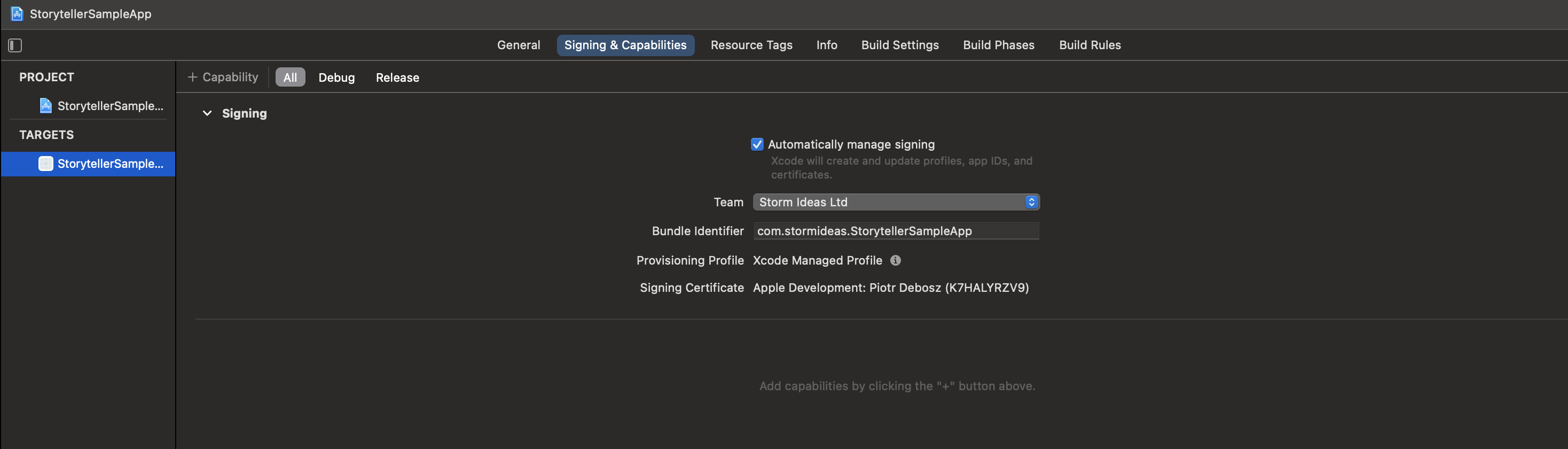
2. Press +Capability
3. Choose Associated Domains
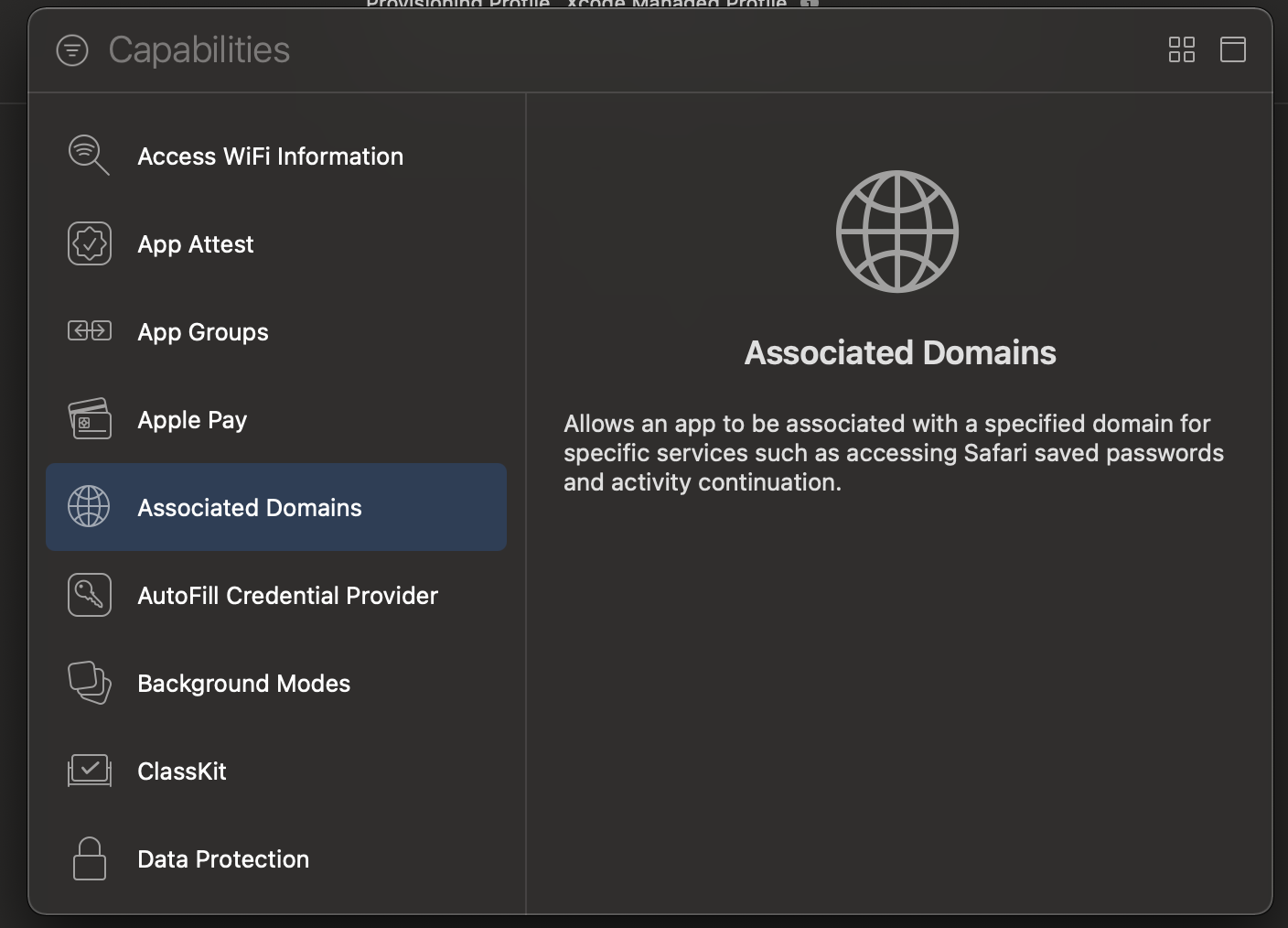
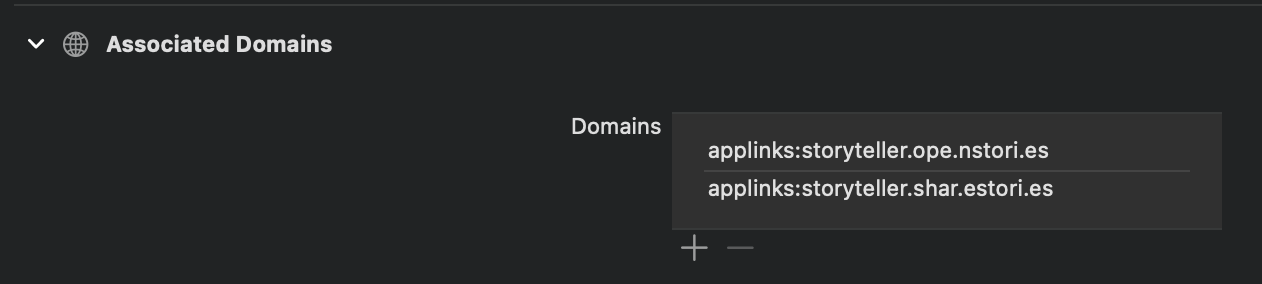
4. Add the following domains:
applinks:[tenant_name].ope.nstori.esapplinks:[tenant_name].shar.estori.es
Add Bundle Identifier to Storyteller CMS#
After setting up an associated domain you need to add a bundle identifier to Storyteller CMS.
1. Log into Storyteller CMS
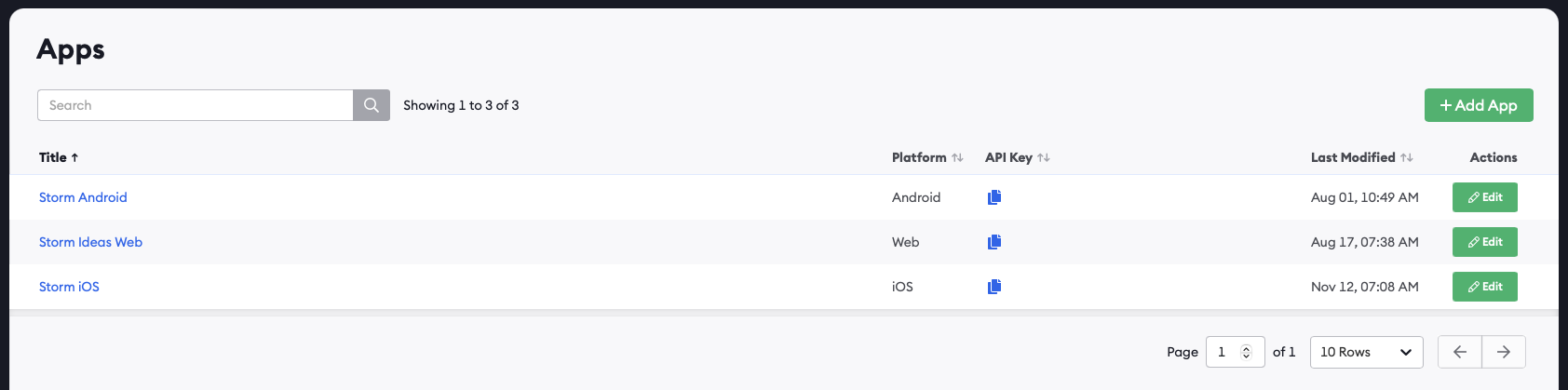
2. Go to Apps
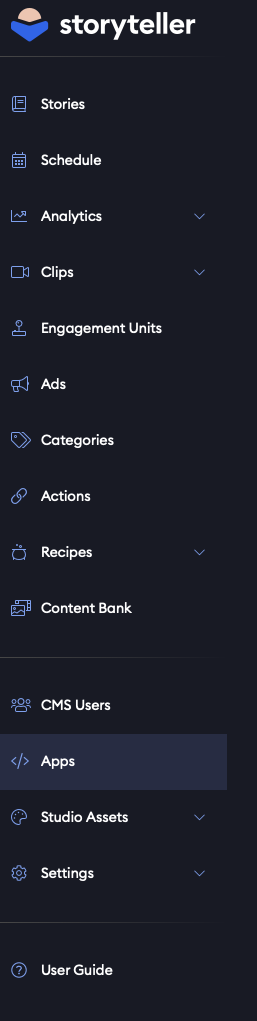
3. Create a new iOS app or edit existing one
4. Fill out App ID
App ID has the form <Application Identifier Prefix>.<Bundle Identifier>
e.g. ABCDE12345.com.example.app
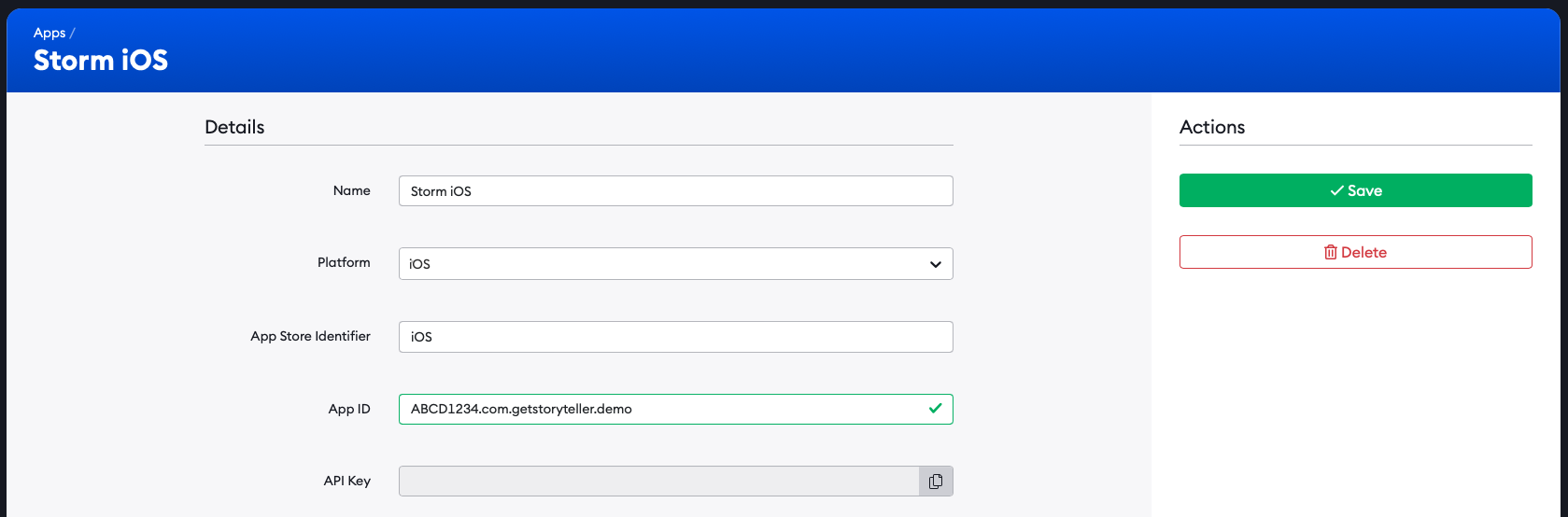
5. Press Save
Register a Custom URL Scheme for your app#
Our SDK supports deeplinking through custom URL schemes. Custom URL schemes allow your application to be launched in a specific context from a custom URL. This is essential for push notifications, as iOS does not support Universal Links from push notifications.
In order to use the custom URL scheme supported by our SDK, you need to register it with the following format: [TENANT_NAME]stories://, E.g. gosportsstories://.
You can follow the next steps to do so:
1. Go to Info tab in your Xcode project settings
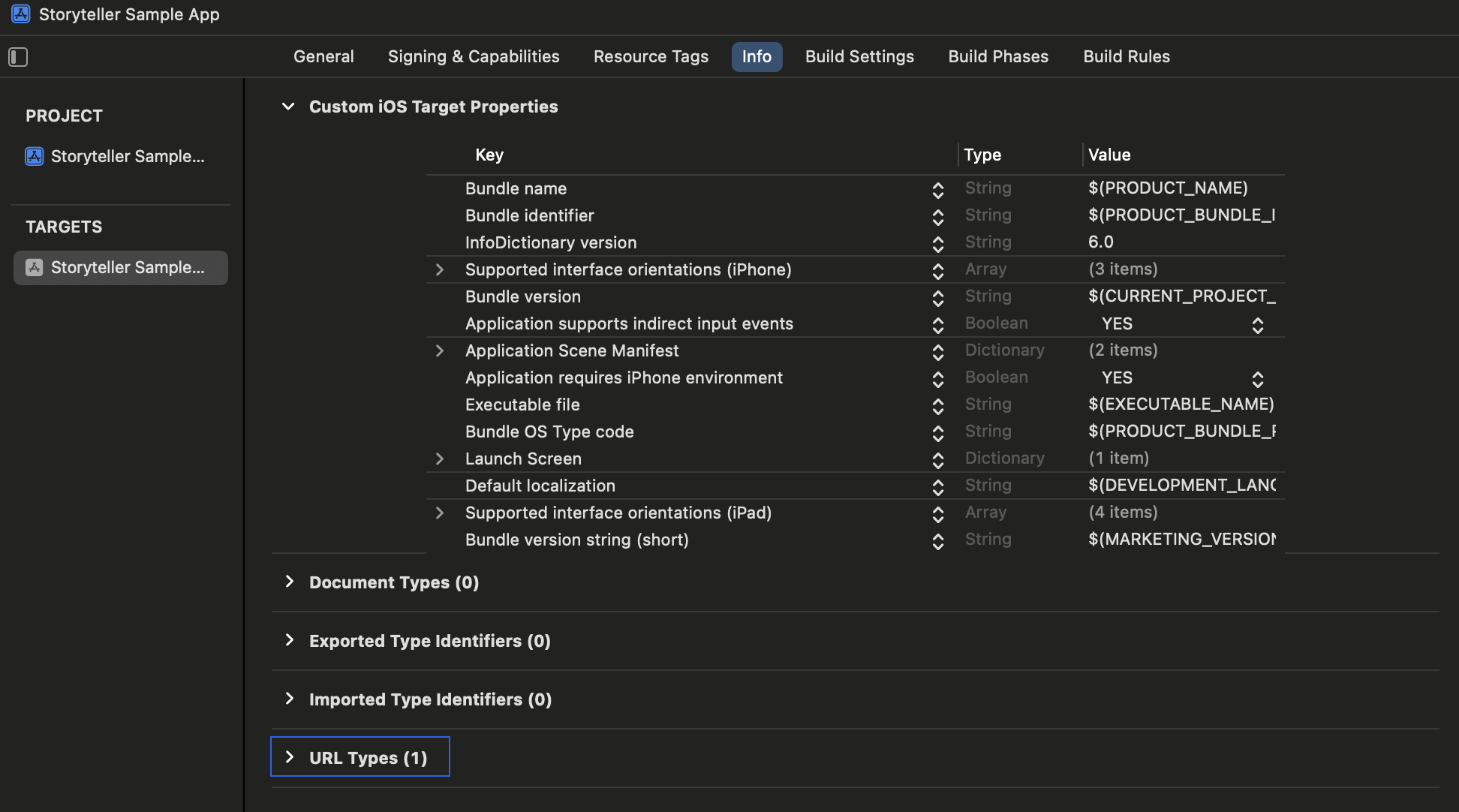
2. Expand URL Types section and add a new URL Type entry. For the Identifier field, you should use a unique identifier, like your app's bundle identifier for example. In URL Schemes, enter [TENANT_NAME]stories, replacing [TENANT_NAME] with your respective Storyteller tenant name. The Role field is only used for macOS applications, and can be ignored on iOS and other platforms.
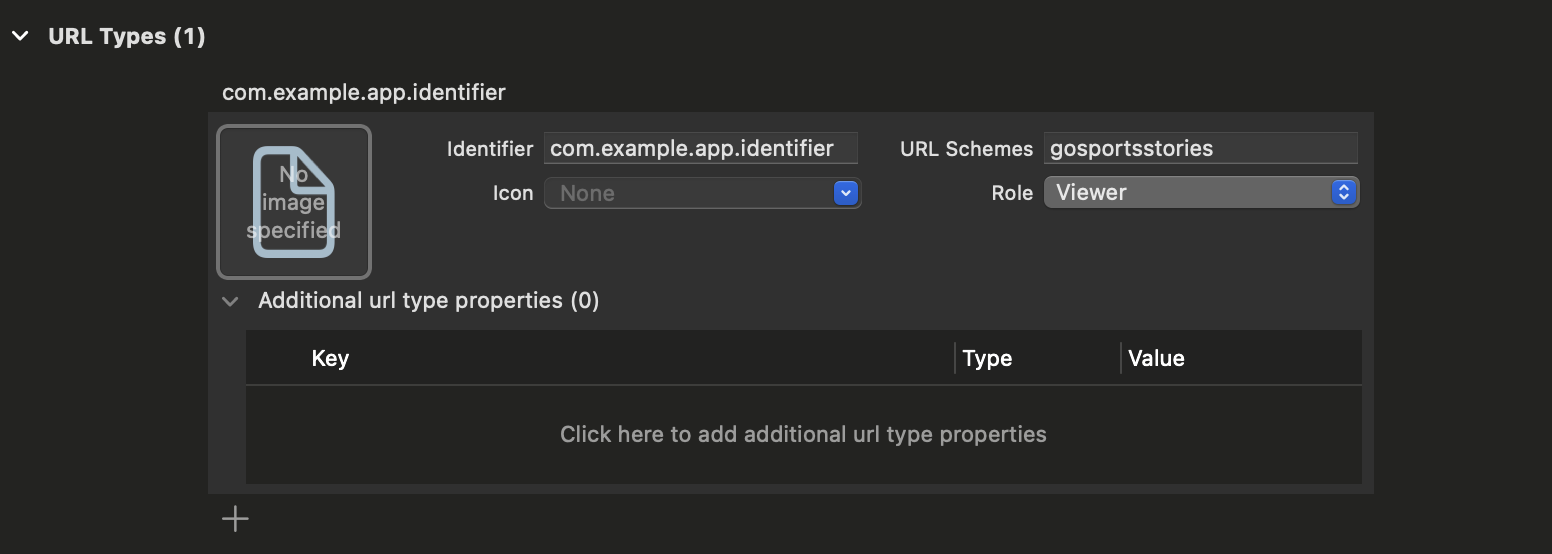
After following these steps, your app should be able to directly launch our SDK in a specific context from a URL with a custom scheme.
Push Notifications: URL scheme links are essential for opening your app from push notifications. See the Handling URL Scheme Links from Push Notifications section below for implementation details.
This feature can be used for example, to directly open a story or a clip with a deeplink url. To directly open a story, the SDK will handle deeplinks with the following format:
[TENANT_ID]stories://open/[STORYID]/[PAGEID]
Or to open a clip:
[TENANT_ID]stories://open/clip/[CLIPID]?collectionId=[COLLECTIONID]
Handle Links in Your App#
StorytellerSDK provides two framework-independent methods:
let url = URL(string: "https://example.shar.estori.es/open/story-id/page-id")!
let isStorytellerLink = Storyteller.shared.isStorytellerDeepLink(url: url)
This method takes in a URL and returns true if the URL is Storyteller deep link.
let url = URL(string: "https://example.shar.estori.es/open/story-id/page-id")!
try await Storyteller.shared.openDeepLink(url: url)
This method opens the Story/Clip that was specified in the URL.
Replacing Active Storyteller Content#
Storyteller.shared.openDeepLink(url:) gives external links replacement behavior:
- The SDK validates the route and its platform support before dismissing anything. A malformed or unrecognized route throws
StorytellerError.wrongInputData; a Sheet destination on tvOS throwsStorytellerError.unsupportedPlatform. Both leave the active Storyteller presentation and any in-flight valid request unchanged. - A valid link to a destination supported on the current platform dismisses the active Story, Clip, nested Player, or Sheet presentation without animation and waits for teardown before opening the requested content.
- If several valid links arrive rapidly, the most recent link supersedes earlier requests. Superseded calls throw
CancellationError, and only the most recent request remains active. - If the route is valid but its remote content is unavailable, the previous presentation has already been dismissed. The SDK throws the existing content or network error and leaves the host app visible.
- Old-content dismissal analytics and callbacks use the existing Player teardown path. The replacement content then uses the normal presentation and open-event path, without stacking another Player.
isStorytellerDeepLink(url:) identifies whether a URL belongs to Storyteller, while openDeepLink(url:) performs complete route validation. Always handle errors from openDeepLink(url:), even after isStorytellerDeepLink(url:) returns true. Recognition does not guarantee platform support: a Sheet link on tvOS throws StorytellerError.unsupportedPlatform; malformed or unrecognized routes throw StorytellerError.wrongInputData.
If your app uses an earlier SDK release without replacement behavior, sequence dismissal and opening explicitly:
guard let url = URL(string: "https://example.shar.estori.es/open/story-id/page-id") else { return }

await Storyteller.shared.dismissPlayer(animated: false)
try await Storyteller.shared.openDeepLink(url: url)
Examples#
Choose the URL-receiving route for your app. UIKit receives Universal Links and custom schemes through app- or scene-delegate methods, depending on the lifecycle your app uses. SwiftUI receives both link types through .onOpenURL.
Add handling deep link to your AppDelegate or UISceneDelegate#
Use UIApplicationDelegate when your app owns lifecycle handling there:
import UIKit
import StorytellerSDK

final class AppDelegate: UIResponder, UIApplicationDelegate {
    func application(
        _ application: UIApplication,
        continue userActivity: NSUserActivity,
        restorationHandler: @escaping ([UIUserActivityRestoring]?) -> Void
    ) -> Bool {
        guard userActivity.activityType == NSUserActivityTypeBrowsingWeb,
              let url = userActivity.webpageURL else {
            return false
        }

        return openStorytellerURL(url)
    }

    func application(
        _ app: UIApplication,
        open url: URL,
        options: [UIApplication.OpenURLOptionsKey: Any] = [:]
    ) -> Bool {
        openStorytellerURL(url)
    }

    private func openStorytellerURL(_ url: URL) -> Bool {
        guard Storyteller.shared.isStorytellerDeepLink(url: url) else {
            return false
        }

        Task { @MainActor in
            do {
                try await Storyteller.shared.openDeepLink(url: url)
            } catch {
                print("Unable to open Storyteller link: \(error.localizedDescription)")
            }
        }
        return true
    }
}
If your app uses scenes, add cold-start handling to your existing scene(_:willConnectTo:options:) implementation and keep the continuation methods for links received while the scene is already connected:
import UIKit
import StorytellerSDK

final class SceneDelegate: UIResponder, UIWindowSceneDelegate {
    func scene(
        _ scene: UIScene,
        willConnectTo session: UISceneSession,
        options connectionOptions: UIScene.ConnectionOptions
    ) {
        if let url = connectionOptions.userActivities.lazy
            .filter({ $0.activityType == NSUserActivityTypeBrowsingWeb })
            .compactMap(\.webpageURL)
            .first(where: { Storyteller.shared.isStorytellerDeepLink(url: $0) }) {
            openStorytellerURL(url)
            return
        }

        guard let url = connectionOptions.urlContexts.lazy
            .map(\.url)
            .first(where: { Storyteller.shared.isStorytellerDeepLink(url: $0) })
        else {
            return
        }

        openStorytellerURL(url)
    }

    func scene(_ scene: UIScene, continue userActivity: NSUserActivity) {
        guard userActivity.activityType == NSUserActivityTypeBrowsingWeb,
              let url = userActivity.webpageURL else {
            return
        }

        openStorytellerURL(url)
    }

    func scene(_ scene: UIScene, openURLContexts URLContexts: Set<UIOpenURLContext>) {
        guard let url = URLContexts.lazy
            .map(\.url)
            .first(where: { Storyteller.shared.isStorytellerDeepLink(url: $0) })
        else {
            return
        }

        openStorytellerURL(url)
    }

    private func openStorytellerURL(_ url: URL) {
        guard Storyteller.shared.isStorytellerDeepLink(url: url) else { return }

        Task { @MainActor in
            do {
                try await Storyteller.shared.openDeepLink(url: url)
            } catch {
                print("Unable to open Storyteller link: \(error.localizedDescription)")
            }
        }
    }
}
For a UIKit app entrypoint using CocoaPods, see the Showcase AppDelegate.
Apply .onOpenURL to a stable root view. SwiftUI sends both Universal Links and custom URL schemes to this modifier.
import StorytellerSDK
import SwiftUI

@available(iOS 14.0, *)
struct StorytellerAppRootView: View {
    var body: some View {
        Text("App content")
            .onOpenURL { url in
                openStorytellerURL(url)
            }
    }

    private func openStorytellerURL(_ url: URL) {
        guard Storyteller.shared.isStorytellerDeepLink(url: url) else { return }

        Task { @MainActor in
            do {
                try await Storyteller.shared.openDeepLink(url: url)
            } catch {
                print("Unable to open Storyteller link: \(error.localizedDescription)")
            }
        }
    }
}
The Showcase app demonstrates forwarding the received URL from .onOpenURL into a shared AppDelegate handler.
After completing the shared setup and one framework route, test both an HTTPS Universal Link and your tenant's custom URL scheme.
Handling URL Scheme Links from Push Notifications#
When using push notifications to deep link into Storyteller content, you must use URL scheme links (not Universal Links) in your notification payload. Here's how to implement this:
Push Notification Payload#
Include a custom URL scheme link in your push notification payload:
{
    "aps": {
        "alert": {
            "title": "Check out this story!",
            "body": "Tap to view the latest content"
        }
    },
    "deeplink_url": "[tenant_name]stories://open/STORY_ID/PAGE_ID"
}
Handling the Deep Link#
The notification should open the custom-scheme URL through the same framework route configured in Handle Links in Your App:
- UIKit routes the URL to
application(_:open:options:). - UIKit apps using scenes route it to
scene(_:openURLContexts:)instead. - SwiftUI routes the URL to
.onOpenURL.
There is no second Storyteller integration path for push notifications. Extract the URL from the notification payload, ask the system to open it, and let your existing URL handler validate and open the Storyteller content.
Extracting Deep Links from Push Notifications#
In your UNUserNotificationCenterDelegate:
@MainActor
func userNotificationCenter(_ center: UNUserNotificationCenter, didReceive response: UNNotificationResponse) async {
    let userInfo = response.notification.request.content.userInfo

    guard
        let deepLink = userInfo["deeplink_url"] as? String,
        let url = URL(string: deepLink)
    else {
        return
    }

    // This will trigger onOpenURL in SwiftUI or application(_:open:options:) in UIKit
    await UIApplication.shared.open(url)
}
Deep Link Handling Details#
The Storyteller.shared.openDeepLink function intelligently parses the provided URL (which can be either an HTTPS link via Associated Domains or a custom scheme link) to determine the type of content to open.
Story Category#
- Identifies links containing
/open/category/or/go/category/in the path. - Extracts the category identifier following
/category/. - Calls the internal equivalent of
Storyteller.shared.openCategorywith the extracted category ID. - Example HTTPS:
https://[tenantname].shar.estori.es/go/category/123456 - Example Custom Scheme:
[tenantname]stories://open/category/123456
Clip Collection#
- Identifies links containing
/open/clip,/go/clip,/open/clips, or/go/clipsin the path. - Requires a
collectionIdquery parameter. - Optionally accepts a
categoryIdquery parameter to specify an initial category. - Optionally accepts a
clipIdpath segment to attempt opening a specific clip within the collection. - Calls the internal equivalent of
Storyteller.shared.openCollectionusing the extracted information. - Example HTTPS:
https://[tenantname].shar.estori.es/open/clip/CLIP_UUID?collectionId=COLLECTION_ID&categoryId=CATEGORY_ID - Example Custom Scheme:
[tenantname]stories://open/clip/CLIP_UUID?collectionId=COLLECTION_ID&categoryId=CATEGORY_ID
Story / Page#
The SDK reads Story and Page IDs from their position in the path. iOS opens an https link in your app only when its path starts with /go/ or /open/; other https paths open in the browser. In every https form, /open/ can replace /go/. In every custom scheme form, go can replace open.
| Content | https form |
Custom scheme form | Behavior |
|---|---|---|---|
| Story | https://[tenant_name].shar.estori.es/go/<storyId> |
[tenant_name]stories://open/<storyId> |
Opens the Story at the viewer's next unread Page, or at its first Page if every Page has been read, as openStory(id:) would. |
| Story at a Page | https://[tenant_name].shar.estori.es/go/<storyId>/<pageId> |
[tenant_name]stories://open/<storyId>/<pageId> |
Opens the Story that contains the Page, starting at that Page, as openPage(id:) would. If the Page is not found, the SDK opens the Story identified by storyId as a Story link would. If the Page is part of a trivia quiz, the Story starts at the first Page of the quiz. |
| Story by external ID | https://[tenant_name].shar.estori.es/go/stories/<externalId> |
[tenant_name]stories://open/stories/<externalId> |
Opens the Story with that external ID, as openStory(externalId:) would. |
Paths such as /go/story/<storyId>, /story/<storyId>, or /page/<pageId> are not Storyteller link formats. Use /go/<storyId> or /go/<storyId>/<pageId>.
Sheet#
Sheets are available only on iOS. On tvOS, openDeepLink(url:) throws StorytellerError.unsupportedPlatform for a Sheet destination before dismissing the current Player, cancelling an existing deep-link request, or waiting for initialization. Story and Clip destinations remain supported on tvOS.
- Identifies links containing
/open/sheet/or/go/sheet/in the path. - Extracts the
sheetIdfrom the path segment following/sheet/. - Calls the internal equivalent of
Storyteller.shared.openSheet(id:). - Example HTTPS:
https://[tenantname].ope.nstori.es/open/sheet/SHEET_ID - Example Custom Scheme:
[tenantname]stories://open/sheet/SHEET_ID
Manual Deep Link Handling#
While Storyteller.shared.openDeepLink provides convenience, you might require more control over your app's state or navigation when a deep link is handled. In such cases, it's recommended to parse the URL yourself (after checking it with Storyteller.shared.isStorytellerDeepLink) and then use the specific Storyteller methods like openStory(id:), openPage(id:), openCollection(configuration:), openCategory(category:), or openSheet(id:) to present the content. This approach allows for custom transitions, loading states, or error handling specific to your application flow. Refer to the Open Player documentation for details on these methods.
API Reference#
isStorytellerDeepLink#
let url = URL(string: "exampletenantstories://open/story-id/page-id")!
let isStorytellerLink = Storyteller.shared.isStorytellerDeepLink(url: url)
Checks if the given url is Storyteller deep link.
openDeepLink#
let url = URL(string: "exampletenantstories://open/story-id/page-id")!
try await Storyteller.shared.openDeepLink(url: url)
This call makes Storyteller open the provided deep link (showing the requested Page / Story / Clip).
If Storyteller content is already active, the valid deep link replaces it after teardown. Invalid routes preserve the active presentation. Rapid valid calls use the most recent link and cancel superseded calls.
Parameters:
url- deep link url.
Throws if the route is invalid, the requested content is not available, a network operation fails, or the call is superseded by a newer valid deep link.
{"slug": "deeplinking", "page_title": "Deep Link into Storyteller", "page_url": "Deeplinking/", "canonical_url": "/ios/Deeplinking/", "markdown": "# Deep linking\n\nTo make sharing and direct content links work, first complete the shared domain and CMS setup, then implement the URL-receiving route for either UIKit or SwiftUI. Both frameworks use `Storyteller.shared.isStorytellerDeepLink(url:)` and `Storyteller.shared.openDeepLink(url:)` after the app receives a URL.\n\n## Understanding Link Types\n\niOS apps support two types of deep links, each serving different purposes:\n\n### Universal Links (HTTPS URLs)\n\n- **When to use**: When it's unknown whether the user has your app installed (e.g., sharing on social media, email links)\n- **Format**: `https://[tenant_name].shar.estori.es/...`\n- **Behavior**: iOS will open your app if installed, otherwise opens the web browser\n- **Setup**: Requires Associated Domains configuration\n\n### URL Scheme Links (Custom URLs)\n\n- **When to use**: When you're certain the user has your app installed (e.g., push notifications, in-app navigation)\n- **Format**: `[tenant_name]stories://...`\n- **Behavior**: Directly opens your app; shows an error if not installed\n- **Setup**: Requires custom URL scheme registration\n\n**Important**: Push notifications on iOS do not support Universal Links for directly opening apps. You must use URL Scheme Links in push notification payloads to ensure your app opens correctly.\n\n## Add Associated Domain to Your Project Settings in Xcode\n\nAt first you need to add associated domain to your projects.\n\n1\\. Go to your project settings in Xcode -> Signing & Capabilities\n\n\n\n2\\. Press `+Capability`\n\n3\\. Choose `Associated Domains`\n\n\n\n4\\. Add the following domains:\n\n- `applinks:[tenant_name].ope.nstori.es`\n- `applinks:[tenant_name].shar.estori.es`\n\n\n\n## Add Bundle Identifier to Storyteller CMS\n\nAfter setting up an associated domain you need to add a bundle identifier to Storyteller CMS.\n\n1\\. Log into Storyteller CMS\n\n2\\. Go to `Apps`\n\n \n\n3\\. Create a new iOS app or edit existing one\n\n \n\n4\\. Fill out `App ID`\n\n App ID has the form `<Application Identifier Prefix>.<Bundle Identifier>`\n e.g. `ABCDE12345.com.example.app`\n\n \n\n5\\. Press `Save`\n\n## Register a Custom URL Scheme for your app\n\nOur SDK supports deeplinking through custom URL schemes. Custom URL schemes allow your application to be launched in a specific context from a custom URL. This is essential for push notifications, as iOS does not support Universal Links from push notifications.\n\nIn order to use the custom URL scheme supported by our SDK, you need to register it with the following format: `[TENANT_NAME]stories://`, E.g. `gosportsstories://`.\n\nYou can follow the next steps to do so:\n\n1\\. Go to Info tab in your Xcode project settings\n\n\n\n2\\. Expand URL Types section and add a new URL Type entry. For the `Identifier` field, you should use a unique identifier, like your app's bundle identifier for example. In `URL Schemes`, enter `[TENANT_NAME]stories`, replacing `[TENANT_NAME]` with your respective Storyteller tenant name. The `Role` field is only used for macOS applications, and can be ignored on iOS and other platforms.\n\n\n\nAfter following these steps, your app should be able to directly launch our SDK in a specific context from a URL with a custom scheme.\n\n**Push Notifications**: URL scheme links are essential for opening your app from push notifications. See the [Handling URL Scheme Links from Push Notifications](#handling-url-scheme-links-from-push-notifications) section below for implementation details.\n\nThis feature can be used for example, to directly open a story or a clip with a deeplink url. To directly open a story, the SDK will handle deeplinks with the following format:\n\n- `[TENANT_ID]stories://open/[STORYID]/[PAGEID]`\n\nOr to open a clip:\n\n- `[TENANT_ID]stories://open/clip/[CLIPID]?collectionId=[COLLECTIONID]`\n\n## Handle Links in Your App\n\nStorytellerSDK provides two framework-independent methods:\n\n<!-- storyteller-swift-example: id=deeplinking-03 target=sdk-ios context=statements -->\n\n```swift\nlet url = URL(string: \"https://example.shar.estori.es/open/story-id/page-id\")!\nlet isStorytellerLink = Storyteller.shared.isStorytellerDeepLink(url: url)\n```\n\nThis method takes in a URL and returns `true` if the URL is Storyteller deep link.\n\n<!-- storyteller-swift-example: id=deeplinking-04 target=sdk-ios context=statements -->\n\n```swift\nlet url = URL(string: \"https://example.shar.estori.es/open/story-id/page-id\")!\ntry await Storyteller.shared.openDeepLink(url: url)\n```\n\nThis method opens the Story/Clip that was specified in the URL.\n\n### Replacing Active Storyteller Content\n\n`Storyteller.shared.openDeepLink(url:)` gives external links replacement behavior:\n\n- The SDK validates the route and its platform support before dismissing anything. A malformed or unrecognized route throws `StorytellerError.wrongInputData`; a Sheet destination on tvOS throws `StorytellerError.unsupportedPlatform`. Both leave the active Storyteller presentation and any in-flight valid request unchanged.\n- A valid link to a destination supported on the current platform dismisses the active Story, Clip, nested Player, or Sheet presentation without animation and waits for teardown before opening the requested content.\n- If several valid links arrive rapidly, the most recent link supersedes earlier requests. Superseded calls throw `CancellationError`, and only the most recent request remains active.\n- If the route is valid but its remote content is unavailable, the previous presentation has already been dismissed. The SDK throws the existing content or network error and leaves the host app visible.\n- Old-content dismissal analytics and callbacks use the existing Player teardown path. The replacement content then uses the normal presentation and open-event path, without stacking another Player.\n\n`isStorytellerDeepLink(url:)` identifies whether a URL belongs to Storyteller, while `openDeepLink(url:)` performs complete route validation. Always handle errors from `openDeepLink(url:)`, even after `isStorytellerDeepLink(url:)` returns `true`. Recognition does not guarantee platform support: a Sheet link on tvOS throws `StorytellerError.unsupportedPlatform`; malformed or unrecognized routes throw `StorytellerError.wrongInputData`.\n\nIf your app uses an earlier SDK release without replacement behavior, sequence dismissal and opening explicitly:\n\n<!-- storyteller-swift-example: id=deeplinking-replacement-workaround target=sdk-ios context=statements -->\n\n```swift\nguard let url = URL(string: \"https://example.shar.estori.es/open/story-id/page-id\") else { return }\n\nawait Storyteller.shared.dismissPlayer(animated: false)\ntry await Storyteller.shared.openDeepLink(url: url)\n```\n\n### Examples\n\nChoose the URL-receiving route for your app. UIKit receives Universal Links and custom schemes through app- or scene-delegate methods, depending on the lifecycle your app uses. SwiftUI receives both link types through `.onOpenURL`.\n\n=== \"UIKit\"\n\n ### Add handling deep link to your AppDelegate or UISceneDelegate\n\n Use `UIApplicationDelegate` when your app owns lifecycle handling there:\n\n <!-- storyteller-swift-example: id=deeplinking-05 target=sdk-ios context=declarations -->\n\n ```swift\n import UIKit\n import StorytellerSDK\n\n final class AppDelegate: UIResponder, UIApplicationDelegate {\n func application(\n _ application: UIApplication,\n continue userActivity: NSUserActivity,\n restorationHandler: @escaping ([UIUserActivityRestoring]?) -> Void\n ) -> Bool {\n guard userActivity.activityType == NSUserActivityTypeBrowsingWeb,\n let url = userActivity.webpageURL else {\n return false\n }\n\n return openStorytellerURL(url)\n }\n\n func application(\n _ app: UIApplication,\n open url: URL,\n options: [UIApplication.OpenURLOptionsKey: Any] = [:]\n ) -> Bool {\n openStorytellerURL(url)\n }\n\n private func openStorytellerURL(_ url: URL) -> Bool {\n guard Storyteller.shared.isStorytellerDeepLink(url: url) else {\n return false\n }\n\n Task { @MainActor in\n do {\n try await Storyteller.shared.openDeepLink(url: url)\n } catch {\n print(\"Unable to open Storyteller link: \\(error.localizedDescription)\")\n }\n }\n return true\n }\n }\n ```\n\n If your app uses scenes, add cold-start handling to your existing `scene(_:willConnectTo:options:)` implementation and keep the continuation methods for links received while the scene is already connected:\n\n <!-- storyteller-swift-example: id=deeplinking-06 target=sdk-ios context=declarations -->\n\n ```swift\n import UIKit\n import StorytellerSDK\n\n final class SceneDelegate: UIResponder, UIWindowSceneDelegate {\n func scene(\n _ scene: UIScene,\n willConnectTo session: UISceneSession,\n options connectionOptions: UIScene.ConnectionOptions\n ) {\n if let url = connectionOptions.userActivities.lazy\n .filter({ $0.activityType == NSUserActivityTypeBrowsingWeb })\n .compactMap(\\.webpageURL)\n .first(where: { Storyteller.shared.isStorytellerDeepLink(url: $0) }) {\n openStorytellerURL(url)\n return\n }\n\n guard let url = connectionOptions.urlContexts.lazy\n .map(\\.url)\n .first(where: { Storyteller.shared.isStorytellerDeepLink(url: $0) })\n else {\n return\n }\n\n openStorytellerURL(url)\n }\n\n func scene(_ scene: UIScene, continue userActivity: NSUserActivity) {\n guard userActivity.activityType == NSUserActivityTypeBrowsingWeb,\n let url = userActivity.webpageURL else {\n return\n }\n\n openStorytellerURL(url)\n }\n\n func scene(_ scene: UIScene, openURLContexts URLContexts: Set<UIOpenURLContext>) {\n guard let url = URLContexts.lazy\n .map(\\.url)\n .first(where: { Storyteller.shared.isStorytellerDeepLink(url: $0) })\n else {\n return\n }\n\n openStorytellerURL(url)\n }\n\n private func openStorytellerURL(_ url: URL) {\n guard Storyteller.shared.isStorytellerDeepLink(url: url) else { return }\n\n Task { @MainActor in\n do {\n try await Storyteller.shared.openDeepLink(url: url)\n } catch {\n print(\"Unable to open Storyteller link: \\(error.localizedDescription)\")\n }\n }\n }\n }\n ```\n\n For a UIKit app entrypoint using CocoaPods, see the Showcase [`AppDelegate`](https://github.com/getstoryteller/storyteller-showcase-ios/blob/11.9.0/cocoapods/StorytellerSampleApp/AppDelegate.swift#L5).\n\n=== \"SwiftUI\"\n\n Apply `.onOpenURL` to a stable root view. SwiftUI sends both Universal Links and custom URL schemes to this modifier.\n\n <!-- storyteller-swift-example: id=deeplinking-swiftui-app-lifecycle target=sdk-ios context=declarations -->\n\n ```swift\n import StorytellerSDK\n import SwiftUI\n\n @available(iOS 14.0, *)\n struct StorytellerAppRootView: View {\n var body: some View {\n Text(\"App content\")\n .onOpenURL { url in\n openStorytellerURL(url)\n }\n }\n\n private func openStorytellerURL(_ url: URL) {\n guard Storyteller.shared.isStorytellerDeepLink(url: url) else { return }\n\n Task { @MainActor in\n do {\n try await Storyteller.shared.openDeepLink(url: url)\n } catch {\n print(\"Unable to open Storyteller link: \\(error.localizedDescription)\")\n }\n }\n }\n }\n ```\n\n The Showcase app demonstrates forwarding the received URL from [`.onOpenURL`](https://github.com/getstoryteller/storyteller-showcase-ios/blob/11.9.0/main/ShowcaseApp/ShowcaseApp.swift#L37) into a shared [`AppDelegate` handler](https://github.com/getstoryteller/storyteller-showcase-ios/blob/11.9.0/main/ShowcaseApp/ShowcaseApp.swift#L152).\n\nAfter completing the shared setup and one framework route, test both an HTTPS Universal Link and your tenant's custom URL scheme.\n\n## Handling URL Scheme Links from Push Notifications\n\nWhen using push notifications to deep link into Storyteller content, you must use URL scheme links (not Universal Links) in your notification payload. Here's how to implement this:\n\n### Push Notification Payload\n\nInclude a custom URL scheme link in your push notification payload:\n\n```json\n{\n \"aps\": {\n \"alert\": {\n \"title\": \"Check out this story!\",\n \"body\": \"Tap to view the latest content\"\n }\n },\n \"deeplink_url\": \"[tenant_name]stories://open/STORY_ID/PAGE_ID\"\n}\n```\n\n### Handling the Deep Link\n\nThe notification should open the custom-scheme URL through the same framework route configured in [Handle Links in Your App](#handle-links-in-your-app):\n\n- UIKit routes the URL to `application(_:open:options:)`.\n- UIKit apps using scenes route it to `scene(_:openURLContexts:)` instead.\n- SwiftUI routes the URL to `.onOpenURL`.\n\nThere is no second Storyteller integration path for push notifications. Extract the URL from the notification payload, ask the system to open it, and let your existing URL handler validate and open the Storyteller content.\n\n### Extracting Deep Links from Push Notifications\n\nIn your `UNUserNotificationCenterDelegate`:\n\n<!-- storyteller-swift-example: id=deeplinking-09 target=sdk-ios context=declarations -->\n\n```swift\n@MainActor\nfunc userNotificationCenter(_ center: UNUserNotificationCenter, didReceive response: UNNotificationResponse) async {\n let userInfo = response.notification.request.content.userInfo\n\n guard\n let deepLink = userInfo[\"deeplink_url\"] as? String,\n let url = URL(string: deepLink)\n else {\n return\n }\n\n // This will trigger onOpenURL in SwiftUI or application(_:open:options:) in UIKit\n await UIApplication.shared.open(url)\n}\n```\n\n## Deep Link Handling Details\n\nThe `Storyteller.shared.openDeepLink` function intelligently parses the provided URL (which can be either an HTTPS link via Associated Domains or a custom scheme link) to determine the type of content to open.\n\n### Story Category\n\n- Identifies links containing `/open/category/` or `/go/category/` in the path.\n- Extracts the category identifier following `/category/`.\n- Calls the internal equivalent of `Storyteller.shared.openCategory` with the extracted category ID.\n- **Example HTTPS:** `https://[tenantname].shar.estori.es/go/category/123456`\n- **Example Custom Scheme:** `[tenantname]stories://open/category/123456`\n\n### Clip Collection\n\n- Identifies links containing `/open/clip`, `/go/clip`, `/open/clips`, or `/go/clips` in the path.\n- Requires a `collectionId` query parameter.\n- Optionally accepts a `categoryId` query parameter to specify an initial category.\n- Optionally accepts a `clipId` path segment to attempt opening a specific clip within the collection.\n- Calls the internal equivalent of `Storyteller.shared.openCollection` using the extracted information.\n- **Example HTTPS:** `https://[tenantname].shar.estori.es/open/clip/CLIP_UUID?collectionId=COLLECTION_ID&categoryId=CATEGORY_ID`\n- **Example Custom Scheme:** `[tenantname]stories://open/clip/CLIP_UUID?collectionId=COLLECTION_ID&categoryId=CATEGORY_ID`\n\n### Story / Page\n\nThe SDK reads Story and Page IDs from their position in the path. iOS opens an `https` link in your app only when its path starts with `/go/` or `/open/`; other `https` paths open in the browser. In every `https` form, `/open/` can replace `/go/`. In every custom scheme form, `go` can replace `open`.\n\n| Content | `https` form | Custom scheme form | Behavior |\n| --- | --- | --- | --- |\n| Story | `https://[tenant_name].shar.estori.es/go/<storyId>` | `[tenant_name]stories://open/<storyId>` | Opens the Story at the viewer's next unread Page, or at its first Page if every Page has been read, as `openStory(id:)` would. |\n| Story at a Page | `https://[tenant_name].shar.estori.es/go/<storyId>/<pageId>` | `[tenant_name]stories://open/<storyId>/<pageId>` | Opens the Story that contains the Page, starting at that Page, as `openPage(id:)` would. If the Page is not found, the SDK opens the Story identified by `storyId` as a Story link would. If the Page is part of a trivia quiz, the Story starts at the first Page of the quiz. |\n| Story by external ID | `https://[tenant_name].shar.estori.es/go/stories/<externalId>` | `[tenant_name]stories://open/stories/<externalId>` | Opens the Story with that external ID, as `openStory(externalId:)` would. |\n\nPaths such as `/go/story/<storyId>`, `/story/<storyId>`, or `/page/<pageId>` are not Storyteller link formats. Use `/go/<storyId>` or `/go/<storyId>/<pageId>`.\n\n### Sheet\n\nSheets are available only on iOS. On tvOS, `openDeepLink(url:)` throws `StorytellerError.unsupportedPlatform` for a Sheet destination before dismissing the current Player, cancelling an existing deep-link request, or waiting for initialization. Story and Clip destinations remain supported on tvOS.\n\n- Identifies links containing `/open/sheet/` or `/go/sheet/` in the path.\n- Extracts the `sheetId` from the path segment following `/sheet/`.\n- Calls the internal equivalent of `Storyteller.shared.openSheet(id:)`.\n- **Example HTTPS:** `https://[tenantname].ope.nstori.es/open/sheet/SHEET_ID`\n- **Example Custom Scheme:** `[tenantname]stories://open/sheet/SHEET_ID`\n\n## Manual Deep Link Handling\n\nWhile `Storyteller.shared.openDeepLink` provides convenience, you might require more control over your app's state or navigation when a deep link is handled. In such cases, it's recommended to parse the URL yourself (after checking it with `Storyteller.shared.isStorytellerDeepLink`) and then use the specific Storyteller methods like `openStory(id:)`, `openPage(id:)`, `openCollection(configuration:)`, `openCategory(category:)`, or `openSheet(id:)` to present the content. This approach allows for custom transitions, loading states, or error handling specific to your application flow. Refer to the [Open Player](OpenPlayer.md) documentation for details on these methods.\n\n## API Reference\n\n### isStorytellerDeepLink\n\n<!-- storyteller-swift-example: id=deeplinking-10 target=sdk-ios context=statements -->\n\n```swift\nlet url = URL(string: \"exampletenantstories://open/story-id/page-id\")!\nlet isStorytellerLink = Storyteller.shared.isStorytellerDeepLink(url: url)\n```\n\nChecks if the given url is Storyteller deep link.\n\n### openDeepLink\n\n<!-- storyteller-swift-example: id=deeplinking-11 target=sdk-ios context=statements -->\n\n```swift\nlet url = URL(string: \"exampletenantstories://open/story-id/page-id\")!\ntry await Storyteller.shared.openDeepLink(url: url)\n```\n\nThis call makes Storyteller open the provided deep link (showing the requested Page / Story / Clip).\n\nIf Storyteller content is already active, the valid deep link replaces it after teardown. Invalid routes preserve the active presentation. Rapid valid calls use the most recent link and cancel superseded calls.\n\nParameters:\n\n1. `url` - deep link url.\n\n**Throws** if the route is invalid, the requested content is not available, a network operation fails, or the call is superseded by a newer valid deep link.\n", "copy_markdown_include_header": false, "base_path": "", "ai_dir": "ai", "missing_payload_behavior": "empty"}