Customize the SDK with StorytellerSdk.setTheme(theme) globally or configuration.theme on an individual view. Import the exported Theme type to check the object structure.
Both light and dark are required by the exported Theme type; use an empty object for a mode you do not customize. Properties inside each mode are optional. ThemeType, FontProvider, ThemeGradient and the nested Search/title structures below describe fields of the exported Theme; they are not standalone exports from the package entry point. A view's configuration.uiStyle selects UIStyle.light, UIStyle.dark, or UIStyle.auto (the device appearance). The modes are separate: a light override does not become a dark override.
The tables were checked against the React Native integration source and Android 12.1.1 / iOS 11.8.0 native defaults. The clips.modal object requires RN 12.1.1 or later. Tenant settings and component behavior can affect the final appearance; omit a field to preserve the applicable default. Native-only catalogue fields are not automatically available through React Native.
Some properties take their default value from others. For example, setting the colors.primary to #FF0000 will also result in the New Indicator for Rectangular Tiles being colored red. Such properties are indicated in the table below.
Note that theme properties may be used for other situations in future.
When the reloadData() method is called to update lists, a reorder animation is added to visualise the updating process.
enablePlayerOpen
true
boolean
Controls whether tapping a list tile opens the Storyteller player automatically. Set to false only when your app intentionally handles tile taps itself.
The ThemeGradient struct allows for the creation of a color gradient, with options to customize both the colors and the positions at which the gradient starts and ends.
Use the exported numeric GradientPosition enum on both platforms. ThemeGradient requires both endpoint colors and both positions, including when using stops. Android accepts omitted positions in untyped JavaScript and falls back to topLeft/bottomRight; iOS ignores a gradient without valid numeric positions or endpoint colors.
Property
Default Value
Data Type
Description
startColor
required
ARGB string
The color where the gradient begins.
endColor
required
ARGB string
The color where the gradient ends.
startPosition
required
GradientPosition
The position indicating where the gradient starts.
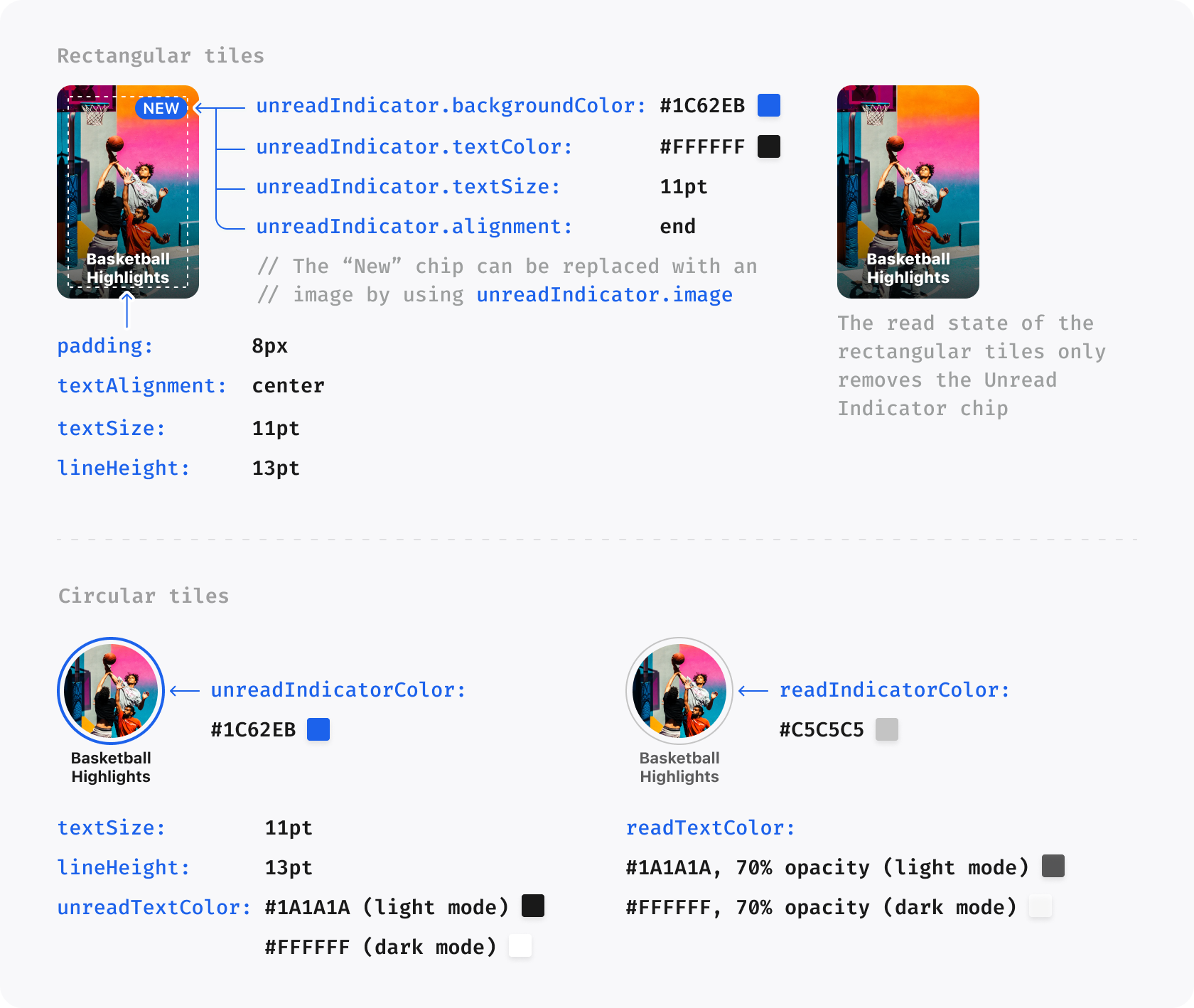
The tiles property customizes list tiles. Use the nested circularTile.liveChip or rectangularTile.liveChip objects on both platforms. The exported top-level tiles.liveChip is parsed only on Android. Both nested live-chip objects also accept optional readBorderColor and unreadBorderColor.
Property
Default Value
Data Type
Description
title.textSize
11
number
The size of the Title on a Tile
title.lineHeight
13
number
The line height of the Title on a Tile
title.alignment
center
ElementAlignment
The alignment of the Title on a Tile. Possible values are left, center and right
circularTile.title.unreadTextColor
inherits colors.black.primary for light, colors.white.primary for dark
ARGB string
The text color of the Title for a circular Tile when the item is unread
circularTile.title.readTextColor
inherits colors.black.tertiary for light, colors.white.tertiary for dark
ARGB string
The text color of the Title for a circular Tile when the item is read
circularTile.unreadIndicatorColor
inherits colors.primary
ARGB string
The color of the ring around a circular tile when the Story is unread
circularTile.readIndicatorColor
#C5C5C5 (iOS), #C1C1C1 (Android)
ARGB string
The color of the ring around a circular tile when the Story is read
circularTile.unreadIndicatorGradient
null
ThemeGradient?
The gradient of the ring around a circular tile when the story or the clip is unread. If set, overrides circularTile.unreadIndicatorColor
circularTile.unreadBorderWidth
2
number
The width of Circular a Tile ring border in unread state
circularTile.readBorderWidth
1
number
The width of a Circular Tile ring border in read state
circularTile.liveChip.readImage
null
ImageSource?
Image to be used in place of default read Live Indicator
circularTile.liveChip.unreadImage
null
ImageSource?
Image to be used in place of default unread Live Indicator
circularTile.liveChip.unreadBackgroundColor
colors.alert
ARGB string
Background color of the Live Indicator when the story contains unread pages or the clip has not been viewed
circularTile.liveChip.readBackgroundColor
colors.black.tertiary
ARGB string
Background color of the Live Indicator when all story pages have been read or the clip has been viewed
circularTile.liveChip.unreadBackgroundGradient
null
ThemeGradient?
The gradient of the ring around a live tile and background of the Live Indicator. If set, overrides circularTile.liveChip.unreadBackgroundColor
circularTile.liveChip.unreadTextColor
colors.white.primary
ARGB string
Text color of the Live Indicator when the story contains unread pages or the clip has not been viewed
circularTile.liveChip.readTextColor
colors.white.primary
ARGB string
Text color of the Live Indicator when all story pages have been read or the clip has been viewed
chip.textSize
11
number
Text size for the New Indicator and Live Indicator
rectangularTile.chip.alignment
right
ElementAlignment
iOS: alignment of rectangular-tile chips. Android currently ignores this exported field and keeps its native alignment
chip.show
true
Boolean
Used to show/hide the new/live chip
rectangularTile.title.textColor
inherits colors.white.primary
ARGB string
The text color of the Story Title for a rectangular tile
rectangularTile.padding
8
number
The internal padding for a rectangular tile
rectangularTile.unreadIndicator.image
null
ImageSource?
An image which can be used in place of the default unread indicator for a rectangular tile. If set, overrides rectangularTile.unreadIndicator.gradient
rectangularTile.unreadIndicator.gradient
null
ThemeGradient?
The background gradient of the unread indicator for a rectangular tile. iOS: if set, overrides rectangularTile.unreadIndicator.backgroundColor. Android currently ignores this field
rectangularTile.unreadIndicator.backgroundColor
inherits colors.primary
ARGB string
The background color of the unread indicator for a rectangular tile
rectangularTile.unreadIndicator.alignment
right
ElementAlignment
This exported field is currently ignored by both RN native converters; use rectangularTile.chip.alignment on iOS
rectangularTile.unreadIndicator.textColor
inherits colors.white.primary
ARGB string
The text color of the unread indicator for a rectangular tile
rectangularTile.unreadIndicator.borderColor
null
ARGB string?
Border color of the unread indicator for a rectangular tile
rectangularTile.liveChip.readImage
null
ImageSource?
Image to be used in place of default read Live Indicator
rectangularTile.liveChip.unreadImage
null
ImageSource?
Image to be used in place of default unread Live Indicator
rectangularTile.liveChip.unreadBackgroundColor
colors.alert
ARGB string
Background color of the Live Indicator when the story contains unread pages or the clip has not been viewed
rectangularTile.liveChip.readBackgroundColor
colors.black.tertiary
ARGB string
Background color of the Live Indicator when all story pages have been read or the clip has been viewed
rectangularTile.liveChip.unreadBackgroundGradient
null
ThemeGradient?
The gradient of the ring around a live tile and background of the Live Indicator. If set, overrides rectangularTile.liveChip.unreadBackgroundColor
rectangularTile.liveChip.unreadTextColor
colors.white.primary
ARGB string
Text color of the Live Indicator when the story contains unread pages or the clip has not been viewed
rectangularTile.liveChip.readTextColor
colors.white.primary
ARGB string
Text color of the Live Indicator when all story pages have been read or the clip has been viewed
rectangularTile.liveChip.unreadBorderColor
null
ARGB string?
Border color of the Live Indicator when the story contains unread pages or the clip has not been viewed.
rectangularTile.liveChip.readBorderColor
null
ARGB string?
Border color of the Live Indicator when all story pages have been read or the clip has been viewed.
iOS 11.6.0 and Android 11.6.3 map clips.topGradient, bottomGradient, feed-switcher/title/category typography, progress-bar position and colours, and four Embedded Clips spacing fields. Omitted or invalid fields preserve native defaults.
The player property is used to customize properties relating to the Story Player.
Property
Default Value
Data Type
Description
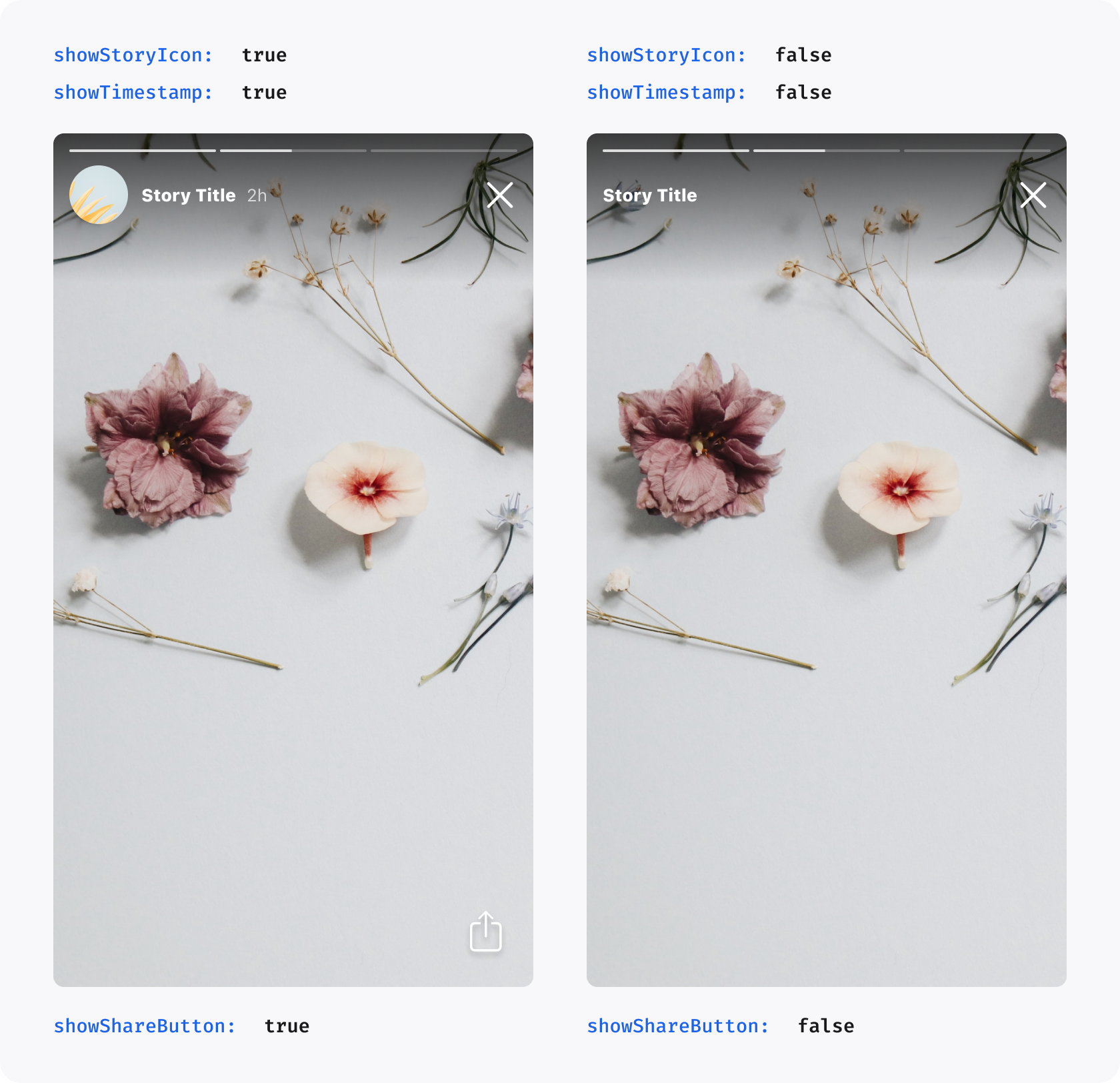
showStoryIcon
false
Boolean
Shows the round Story icon before the Story Title in the Player
showTimestamp
true
Boolean
Shows the timestamp after the Story Title in the Player, indicating how long ago a Story was published
showShareButton
true
Boolean
Shows the share button in the Player. Set to false to hide this player button
showLikeButton
true
Boolean
Shows the like button in the Player. Set to false to hide this player button
showMoreButton
native behavior
boolean
Exported, but currently does not control the More button through RN on either platform
enableFollowableCategorySwipeFromRightEdge
true
Boolean
Enables the Clips followable category/profile screen swipe gesture from the right edge
liveChip.image
null
ImageSource?
Image used in place of Live Chip before Live Story or Clip Titles. If set, it overrides liveChip.backgroundGradient
liveChip.textColor
colors.white.primary
ARGB string?
iOS: badge label color for Live Story or Clip. Android currently ignores the ARGB string override
liveChip.backgroundGradient
null
ThemeGradient?
Background gradient of the badge for Live Story or Clip. If set, it overrides liveChip.backgroundColor
liveChip.backgroundColor
theme.colors.alert
ARGB string?
iOS: badge background color for Live Story or Clip. Android currently ignores the ARGB string override
liveChip.borderColor
null
ARGB string
Border color of the badge for Live Story or Clip
icons.share
null
ImageSource
An image to be used in place of the default share icon
icons.refresh
null
ImageSource
Refresh button image to be used in place of default refresh icon
icons.close
null
ImageSource
Android: replaces the close icon. iOS currently ignores this field
icons.like.initial
null
ImageSource
Initial like button image to be used in place of default initial like icon
icons.like.liked
null
ImageSource
Liked button image to be used in place of default liked icon
icons.like.animation.liked
null
PlayerLikeAnimationResource?
Lottie animation played when a Clips like button moves from unliked to liked
icons.like.animation.unliked
null
PlayerLikeAnimationResource?
Lottie animation played when a Clips like button moves from liked to unliked
icons.back
null
ImageSource
Back button image to be used in place of the default Clips back icon
icons.more
null
ImageSource
Exported, but currently not applied through the RN/native theme path on either platform
icons.mute.muted
null
ImageSource
Image used for the mute button when audio is muted in Stories and Clips
icons.mute.unmuted
null
ImageSource
Image used for the mute button when audio is unmuted in Stories and Clips
icons.captions.enabled
null
ImageSource
Image used for the captions button when captions are enabled in Stories and Clips
icons.captions.disabled
null
ImageSource
Image used for the captions button when captions are disabled in Stories and Clips
clips.showButtonBackgrounds
true
Boolean
Controls whether Clips player action buttons render the default circular backgrounds
clips.actionIconSize
32
number
Size for Clips player action icons. Values outside the native supported range are clamped
clips.topGradient
native readability scrim
ThemeGradient?
iOS 11.6.0+ and Android 11.6.3+: top Clips readability gradient; a fully transparent gradient is a valid visual opt-out
clips.bottomGradient
native readability scrim
ThemeGradient?
iOS 11.6.0+ and Android 11.6.3+: bottom Clips readability gradient
clips.feedSwitcher.selected.fontWeight
native selected weight
StorytellerFontWeight?
iOS 11.6.0+ and Android 11.6.3+: selected For You/Following label weight
clips.feedSwitcher.selected.textSize
15
number?
iOS 11.6.0+ and Android 11.6.3+: selected feed label size
clips.feedSwitcher.selected.lineHeight
20
number?
iOS 11.6.0+ and Android 11.6.3+: selected feed label line height
clips.feedSwitcher.unselected.fontWeight
native unselected weight
StorytellerFontWeight?
iOS 11.6.0+ and Android 11.6.3+: unselected For You/Following label weight
clips.feedSwitcher.unselected.textSize
15
number?
iOS 11.6.0+ and Android 11.6.3+: unselected feed label size
clips.feedSwitcher.unselected.lineHeight
20
number?
iOS 11.6.0+ and Android 11.6.3+: unselected feed label line height
clips.progressBar.position
bottom
StorytellerClipsProgressBarPosition?
iOS 11.6.0+ and Android 11.6.3+: bottom or aboveAction for Embedded Clips
clips.progressBar.playedColor
native compatibility colour
ARGB string?
iOS 11.6.0+ and Android 11.6.3+: non-scrubbing played-track colour
clips.progressBar.remainingColor
native compatibility colour
ARGB string?
iOS 11.6.0+ and Android 11.6.3+: non-scrubbing remaining-track colour
clips.progressBar.active.playedColor
inherits configured base
ARGB string?
iOS 11.6.0+ and Android 11.6.3+: played-track colour while scrubbing
clips.progressBar.active.remainingColor
inherits configured base
ARGB string?
iOS 11.6.0+ and Android 11.6.3+: remaining-track colour while scrubbing
clips.progressBar.active.currentTimeColor
native compatibility colour
ARGB string?
iOS 11.6.0+ and Android 11.6.3+: current-time and separator colour while scrubbing
clips.progressBar.active.totalTimeColor
native compatibility colour
ARGB string?
iOS 11.6.0+ and Android 11.6.3+: total-duration colour while scrubbing
clips.title.font
inherits global font
FontProvider?
Custom font for the Clips player title
clips.title.fontWeight
native title weight
StorytellerFontWeight?
iOS 11.6.0+ and Android 11.6.3+: title font weight
clips.title.textSize
16
number
Text size for the Clips player title
clips.title.lineHeight
null
number?
Line height for the Clips player title
clips.title.textColor
inherits colors.white.primary
ARGB string?
Text color for the Clips player title
clips.eyebrow.font
inherits global font
FontProvider?
Custom font for the Clips player eyebrow text
clips.eyebrow.textSize
15
number
Text size for the Clips player eyebrow text
clips.eyebrow.lineHeight
native font line height (iOS), 20 (Android)
number?
Line height for the Clips player eyebrow text
clips.eyebrow.textColor
inherits colors.white.secondary
ARGB string?
Text color for the Clips player eyebrow text
clips.categoryNavigation.fontWeight
regular
StorytellerFontWeight?
iOS 11.6.0+ and Android 11.6.3+: category-navigation label weight
clips.categoryNavigation.textSize
16
number?
iOS 11.6.0+ and Android 11.6.3+: category-navigation label size
clips.categoryNavigation.lineHeight
native font line height
number?
iOS 11.6.0+ and Android 11.6.3+: category-navigation label line height
clips.spacing.backButtonStartInset
0
number
Start inset for the Clips back or close button
clips.spacing.contentInsetHorizontal
16
number
Horizontal/top padding for Clips description and action content areas
clips.spacing.contentInsetBottom
16
number
Bottom padding for Clips description and action content areas
clips.spacing.actionSpacing
12
number
Vertical spacing between Clips action icons
clips.spacing.eyebrowToTitleSpacing
4
number
Spacing between Clips eyebrow text and title
clips.spacing.titleToActionSpacing
16
number
Horizontal gap between Clips text content and the action icon column
clips.spacing.titleToCategoriesSpacing
native layout
number?
iOS 11.6.0+ and Android 11.6.3+: Embedded Clips title-to-categories spacing
clips.spacing.categoriesToMoreSpacing
native layout
number?
iOS 11.6.0+ and Android 11.6.3+: Embedded Clips categories-to-expansion spacing
clips.spacing.metadataToProgressBarSpacing
native layout
number?
iOS 11.6.0+ and Android 11.6.3+: Embedded Clips metadata-to-progress spacing
clips.spacing.progressBarToActionSpacing
native layout
number?
iOS 11.6.0+ and Android 11.6.3+: Embedded Clips progress-to-primary-action spacing
clips.modal
null
object?
Requires RN 12.1.1 (Android 12.1.1 / iOS 11.8.0): full-screen Clips Player layout. See Modal Clips layout
From RN 12.1.1, player.clips.modal customizes the full-screen Clips Player opened from a Clips list or StorytellerSdk.openCollection. Embedded Clips keep using clips.spacing and clips.progressBar.position. These options do not style the Stories Player. These are app-side options, not remote Settings.
Set it under light and dark. Full-screen ad creatives keep their own lower-content layout; the modal metadata/progress spacing overrides apply to organic Clips. Leave modal, or any property in it, unset to keep the existing layout. Keep using icons.back for the Back image, clips.topGradient and clips.bottomGradient for gradient colours, clips.progressBar for track colours, and the existing typography options.
Property
Type
Effect when set
drawBehindStatusBar
boolean?
Extends the video behind the status bar; navigation stays inside the safe area
feedSwitcherItemSpacing
number?
Gap between the For You and Following labels
titleToCategoriesSpacing
number?
Gap between the title/description and categories
categoriesToMoreSpacing
number?
Gap between categories and the More/Less control
metadataToProgressBarSpacing
number?
Gap between metadata and the resting progress track
progressBarToActionSpacing
number?
Gap between the progress track and the primary action
progressBarPosition
StorytellerClipsProgressBarPosition?
aboveAction places progress above a visible primary action; without one it stays at the bottom
topGradientHeight, bottomGradientHeight
number?
Readability gradient heights
progressBarHeight, progressBarActiveHeight
number?
Resting and scrubbing track heights; the drag target stays at least 48
progressBarInsetHorizontal
number?
Horizontal track inset from the video edges
navigationIconSize
number?
Back and Search glyph size; the buttons stay at least 48 × 48
navigationInsetHorizontal, navigationInsetTop
number?
Navigation inset from the safe area
navigationHeight
number?
Navigation row height
searchIcon
ImageSource?
Replaces the Search icon
Values are dp on Android and points on iOS. Spacing, insets and gradient heights accept zero; negative values are ignored. Heights and the icon size must be positive. A positive navigationHeight below 48 uses 48. Invalid values are ignored on both platforms rather than failing the theme. Android uses whole dp: fractional values round to the nearest dp, and a positive height or icon size is at least 1 dp.
The search property applies customizations to the Search component.
iOS 11.6.0 and Android 11.6.3 support complete Search styling for backgrounds, input, filter button, suggestions, no-results content, the Filters sheet and options, and the Apply button. Partial configurations fall back per field.
Property
Default Value
Data Type
Description
backIcon
chevron.backward system image on iOS, default back icon on Android
ImageSource?
Image to be used as a back icon in the Search UI
heading.font
global custom font / system font
FontProvider
Defines the styling of the Filters title in the Filter View
heading.textSize
22
number
Size of the Filter View title
heading.lineHeight
28
number
The line height of the Filter View title
heading.textCase
default
TextCase
Sets the text case for Filter View title. Possible values are upper, lower and default
heading.textColor
lists.title.textColor (iOS), mode foreground color (Android)
ARGB string
Color of Filter View title
backgroundColor
native Search background
ARGB string?
iOS 11.6.0+ and Android 11.6.3+: Search screen background
input.backgroundColor
native input background
ARGB string?
iOS 11.6.0+ and Android 11.6.3+: Search input background
input.textColor
native text colour
ARGB string?
iOS 11.6.0+ and Android 11.6.3+: entered Search text colour
input.placeholderTextColor
native placeholder colour
ARGB string?
iOS 11.6.0+ and Android 11.6.3+: placeholder colour
input.iconColor
native icon colour
ARGB string?
iOS 11.6.0+ and Android 11.6.3+: Search/clear icon colour
input.cornerRadius
native radius
number?
iOS 11.6.0+ and Android 11.6.3+: input corner radius
Set customFont to use packaged custom fonts throughout the SDK. Text-specific font objects use the same FontProvider structure.
iOS: use the font's registered name (for example, its PostScript name), and register the bundled font with your app. The current RN parser requires all six keys: regular, medium, semibold, bold, heavy, and black. A partial object is ignored even though TypeScript allows it. Reuse a font name for several weights if needed. Optional light falls back to regular when omitted.
Android: for assets/fonts loading, use the exact filename including its extension (for example, Montserrat-Medium.ttf). Missing files use a system fallback. The separate res/font family lookup described below also accepts names without an extension.
StorytellerFontWeight uses light, regular, medium, semiBold, bold, heavy, and black for Clips typography. The FontProvider key is spelled semibold.
On Android, custom fonts can be packaged in either of these locations:
android/app/src/main/assets/fonts/ for file-based font loading.
android/app/src/main/res/font/ for Android font resources. This is recommended when the same custom font theme is used across
multiple Storyteller lists or re-rendered often, because Android can reuse packaged font resources more efficiently.
When using res/font, define a font-family XML resource and include the matching font files. For example:
On Android, the SDK normalizes common font file names such as Montserrat-Medium or Montserrat-Medium.ttf to find a matching
res/font/montserrat.xml font-family resource. If no matching font resource is found, it falls back to file-based loading from assets/fonts.
This applies to both global themes set with StorytellerSdk.setTheme(theme) and per-view themes passed through a Storyteller component's configuration.theme.
The home property customizes Storyteller Home. In the audited RN source, home.headerTitle is applied on iOS but ignored on Android because its converter reads a different key. The other exported Home typography fields below are parsed on both platforms.
Property
Default Value
Data Type
Description
headerTitle.font
global custom font (iOS), system font (Android)
FontProvider
Custom font for the heading; iOS inherits customFont when omitted
headerTitle.textSize
22
number
Size of the title in section
headerTitle.lineHeight
28 (iOS), 25 (Android native default)
number
The line height of the title on in section
headerTitle.textCase
default
TextCase
Sets the heading text case. Possible values are upper, lower and default
headerTitle.textColor
mode foreground color
ARGB string
Color of heading text in Storyteller Home
circularTitle.textSize
11 (iOS), lists.title.textSize (Android)
number
Size of the circular title in section
circularTitle.lineHeight
13 (iOS), lists.title.lineHeight (Android)
number
The line height of the circular title on in section
Custom-image fields accept React Native bundled assets, such as require('./assets/share-icon.png'). The wrapper resolves bundled assets before sending the theme to native code. Prefer packaged images for player controls; a URI object must identify an image the platform can load. Image fields are typed as any in the exported theme; ImageSource here describes the accepted image input rather than a separately exported SDK type.
The resource can be a string or an object with name, iosName, androidResourceName, and bundlePath. The same resource name can be used on both platforms when the iOS app bundle and Android res/raw resource share a file name:
Set this object at light.player.icons.like.animation and/or dark.player.icons.like.animation.
On iOS, name is resolved from the app bundle. On Android, name is resolved from the app's res/raw/<name>.json resources. If the resource names differ by platform, provide iosName or androidResourceName:
The FontProvider structure contains six required font-name strings (regular, medium, semibold, bold, heavy, black) and optional light. Theme fields accept Partial<FontProvider>, but the iOS parser still requires those six strings. See the Fonts section for platform-specific requirements.
RN 12 exposes these theme overrides on Android native 12.0.0 and iOS native 11.7.0 under light and dark, except where marked Android-only. Omit them to preserve native or remote defaults.
sheets.cornerRadius: non-negative top corner radius in dp (Android) or points (iOS) for SDK-owned sheets. Zero produces square corners.
player.clips.embeddedVideoSizing: StorytellerEmbeddedClipsVideoSizing.legacy or .widthConstrained. Applies only to Embedded Clips; omission inherits remote settings.
instructions.button.textSize and .lineHeight: Android-only positive values in sp for the Clips Instructions button.
Gradients accept an optional stops array of { color, location } entries on both platforms. Supply at least two entries with finite, non-decreasing locations from 0 to 1. Equal locations are supported. Retain startColor, endColor, startPosition and endPosition for compatibility and malformed-input fallback. Invalid stops fall back to these endpoint colors.
{"slug": "themes", "page_title": "Themes", "page_url": "Themes/", "canonical_url": "/react-native/Themes/", "markdown": "# Themes\n\nCustomize the SDK with `StorytellerSdk.setTheme(theme)` globally or `configuration.theme` on an individual view. Import the exported `Theme` type to check the object structure.\n\n```tsx\nimport StorytellerSdk, { StorytellerStoriesRowView, type Theme } from '@getstoryteller/react-native-storyteller-sdk';\n\nconst globalTheme: Theme = {\n light: { colors: { primary: '#309C47' } },\n dark: { colors: { primary: '#ACB32E' } },\n};\nStorytellerSdk.setTheme(globalTheme);\n```\n\nSet the global theme early in your application's lifecycle. To give a list its own theme, pass it in the view's configuration:\n\n```tsx\nconst myTheme: Theme = {\n light: { tiles: { title: { textSize: 14 } } },\n dark: { tiles: { title: { textSize: 14 } } },\n};\n\n<StorytellerStoriesRowView configuration={{ theme: myTheme }} />;\n```\n\n> For more information on setting a theme on an individual list, see [StorytellerListView](StorytellerListViews.md).\n\n## Configuring a UiTheme\n\nA `Theme` consists of the following properties:\n\n- `light` sets the `ThemeType` to apply for light mode.\n- `dark` sets the `ThemeType` to apply for dark mode.\n\n## Creating Themes\n\nBoth `light` and `dark` are required by the exported `Theme` type; use an empty object for a mode you do not customize. Properties inside each mode are optional. `ThemeType`, `FontProvider`, `ThemeGradient` and the nested Search/title structures below describe fields of the exported `Theme`; they are not standalone exports from the package entry point. A view's `configuration.uiStyle` selects `UIStyle.light`, `UIStyle.dark`, or `UIStyle.auto` (the device appearance). The modes are separate: a light override does not become a dark override.\n\nThe tables were checked against the React Native integration source and Android 12.1.1 / iOS 11.8.0 native defaults. The `clips.modal` object requires RN 12.1.1 or later. Tenant settings and component behavior can affect the final appearance; omit a field to preserve the applicable default. Native-only catalogue fields are not automatically available through React Native.\n\nSome properties take their default value from others. For example, setting the `colors.primary` to `#FF0000` will also result in the New Indicator for Rectangular Tiles being colored red. Such properties are indicated in the table below.\n\nNote that theme properties may be used for other situations in future.\n\n### Colors\n\nThe `colors` property on theme is used to establish a set of base colors for the SDK to use.\n\n| Property | Default Value | Data Type | Description |\n| ----------------- | ------------------------------ | ------------- | ---------------------------------------------------------------------------------------------------- |\n| `primary` | `#1C62EB` | `ARGB string` | The default accent color used throughout the UI. In general, this should be the primary brand color. |\n| `success` | `#3BB327` | `ARGB string` | Used to indicate correct answers in Quizzes. |\n| `alert` | `#E21219` | `ARGB string` | Used to indicate incorrect answers in Quizzes. |\n| `white.primary` | `#FFFFFF` | `ARGB string` | Used for white text |\n| `white.secondary` | `white.primary` at 85% opacity | `ARGB string` | Used for light text |\n| `white.tertiary` | `white.primary` at 70% opacity | `ARGB string` | Used for gray text |\n| `black.primary` | `#1A1A1A` | `ARGB string` | Used for black text |\n| `black.secondary` | `black.primary` at 85% opacity | `ARGB string` | Used for light black text |\n| `black.tertiary` | `black.primary` at 70% opacity | `ARGB string` | Used for gray text |\n\n---\n\n### Primitives\n\nThe `primitives` object contains base values which are used throughout the SDK.\n\n| Property | Default Value | Data Type | Description |\n| -------------- | ------------- | --------- | --------------------------------------------------------------------------- |\n| `cornerRadius` | `8` | `number` | The corner radius used for rectangular tiles, buttons and poll/quiz answers |\n\n---\n\n### Lists\n\nThe `lists` customizes properties of the various list types available from the SDK.\n\n| Property | Default Value | Data Type | Description |\n| ----------------------- | ----------------------------------------------------------------------- | -------------- | ---------------------------------------------------------------------------------------------------------------------------------------------------------- |\n| `row.tileSpacing` | `8` | `number` | The space between each Tile in a row |\n| `row.startInset` | `12` | `number` | The space before the first Tile in a row |\n| `row.endInset` | `12` | `number` | The space after the last Tile in a row |\n| `grid.tileSpacing` | `8` | `number` | The space between each Tile in a grid, both vertically and horizontally |\n| `grid.columns` | `2` | `number` | The number of columns in a grid |\n| `grid.topInset` | `0` | `number` | The space before the first row in a grid |\n| `grid.bottomInset` | `0` | `number` | The space after the last row in a grid |\n| `backgroundColor` | `colors.white.primary` (light mode), `colors.black.primary` (dark mode) | `ARGB string` | Required for outline on Live chip and fade to the side of the row. |\n| `title.font` | global custom font (iOS), system font (Android unless set) | `FontProvider` | Defines the font of the Title in Section |\n| `title.textSize` | `22` | `number` | Size of the Title in Section |\n| `title.lineHeight` | `28` | `number` | The line height of the Title in Section |\n| `title.textCase` | `default` | `TextCase` | Sets the text case for the Title in Section. Possible values are `upper`, `lower` and `default` |\n| `title.textColor` | `colors.black.primary` (light), `colors.white.primary` (dark) | `ARGB string` | Color of Title in Section |\n| `animateTilesOnReorder` | `true` | `boolean` | When the `reloadData()` method is called to update lists, a reorder animation is added to visualise the updating process. |\n| `enablePlayerOpen` | `true` | `boolean` | Controls whether tapping a list tile opens the Storyteller player automatically. Set to `false` only when your app intentionally handles tile taps itself. |\n\n---\n\n### Gradient\n\nThe `ThemeGradient` struct allows for the creation of a color gradient, with options to customize both the colors and the positions at which the gradient starts and ends.\n\nUse the exported numeric `GradientPosition` enum on both platforms. `ThemeGradient` requires both endpoint colors and both positions, including when using `stops`. Android accepts omitted positions in untyped JavaScript and falls back to `topLeft`/`bottomRight`; iOS ignores a gradient without valid numeric positions or endpoint colors.\n\n| Property | Default Value | Data Type | Description |\n| --------------- | ------------- | ------------------ | -------------------------------------------------- |\n| `startColor` | required | `ARGB string` | The color where the gradient begins. |\n| `endColor` | required | `ARGB string` | The color where the gradient ends. |\n| `startPosition` | required | `GradientPosition` | The position indicating where the gradient starts. |\n| `endPosition` | required | `GradientPosition` | The position indicating where the gradient ends. |\n\n#### Enum: GradientPosition\n\nDefines positions for starting and ending points of the gradient.\n\n| Value | Data Type | Description |\n| ----------------------------------- | --------- | ----------------------------------------- |\n| `GradientPosition.bottomLeft` (0) | `number` | Bottom left corner of the gradient area. |\n| `GradientPosition.bottomCenter` (1) | `number` | Bottom center edge of the gradient area. |\n| `GradientPosition.bottomRight` (2) | `number` | Bottom right corner of the gradient area. |\n| `GradientPosition.centerLeft` (3) | `number` | Center left edge of the gradient area. |\n| `GradientPosition.centerCenter` (4) | `number` | Center of the gradient area. |\n| `GradientPosition.centerRight` (5) | `number` | Center right edge of the gradient area. |\n| `GradientPosition.topLeft` (6) | `number` | Top left corner of the gradient area. |\n| `GradientPosition.topCenter` (7) | `number` | Top center edge of the gradient area. |\n| `GradientPosition.topRight` (8) | `number` | Top right corner of the gradient area. |\n\n### Tiles\n\nThe `tiles` property customizes list tiles. Use the nested `circularTile.liveChip` or `rectangularTile.liveChip` objects on both platforms. The exported top-level `tiles.liveChip` is parsed only on Android. Both nested live-chip objects also accept optional `readBorderColor` and `unreadBorderColor`.\n\n| Property | Default Value | Data Type | Description |\n| --------------------------------------------------- | -------------------------------------------------------------------------------- | ------------------ | -------------------------------------------------------------------------------------------------------------------------------------------------------------------------------------- |\n| `title.textSize` | `11` | `number` | The size of the Title on a Tile |\n| `title.lineHeight` | `13` | `number` | The line height of the Title on a Tile |\n| `title.alignment` | `center` | `ElementAlignment` | The alignment of the Title on a Tile. Possible values are `left`, `center` and `right` |\n| `circularTile.title.unreadTextColor` | inherits `colors.black.primary` for `light`, `colors.white.primary` for `dark` | `ARGB string` | The text color of the Title for a circular Tile when the item is unread |\n| `circularTile.title.readTextColor` | inherits `colors.black.tertiary` for `light`, `colors.white.tertiary` for `dark` | `ARGB string` | The text color of the Title for a circular Tile when the item is read |\n| `circularTile.unreadIndicatorColor` | inherits `colors.primary` | `ARGB string` | The color of the ring around a circular tile when the Story is unread |\n| `circularTile.readIndicatorColor` | `#C5C5C5` (iOS), `#C1C1C1` (Android) | `ARGB string` | The color of the ring around a circular tile when the Story is read |\n| `circularTile.unreadIndicatorGradient` | `null` | `ThemeGradient?` | The gradient of the ring around a circular tile when the story or the clip is unread. If set, overrides `circularTile.unreadIndicatorColor` |\n| `circularTile.unreadBorderWidth` | `2` | `number` | The width of Circular a Tile ring border in unread state |\n| `circularTile.readBorderWidth` | `1` | `number` | The width of a Circular Tile ring border in read state |\n| `circularTile.liveChip.readImage` | `null` | `ImageSource?` | Image to be used in place of default read Live Indicator |\n| `circularTile.liveChip.unreadImage` | `null` | `ImageSource?` | Image to be used in place of default unread Live Indicator |\n| `circularTile.liveChip.unreadBackgroundColor` | `colors.alert` | `ARGB string` | Background color of the Live Indicator when the story contains unread pages or the clip has not been viewed |\n| `circularTile.liveChip.readBackgroundColor` | `colors.black.tertiary` | `ARGB string` | Background color of the Live Indicator when all story pages have been read or the clip has been viewed |\n| `circularTile.liveChip.unreadBackgroundGradient` | `null` | `ThemeGradient?` | The gradient of the ring around a live tile and background of the Live Indicator. If set, overrides `circularTile.liveChip.unreadBackgroundColor` |\n| `circularTile.liveChip.unreadTextColor` | `colors.white.primary` | `ARGB string` | Text color of the Live Indicator when the story contains unread pages or the clip has not been viewed |\n| `circularTile.liveChip.readTextColor` | `colors.white.primary` | `ARGB string` | Text color of the Live Indicator when all story pages have been read or the clip has been viewed |\n| `chip.textSize` | `11` | `number` | Text size for the New Indicator and Live Indicator |\n| `rectangularTile.chip.alignment` | `right` | `ElementAlignment` | iOS: alignment of rectangular-tile chips. Android currently ignores this exported field and keeps its native alignment |\n| `chip.show` | `true` | `Boolean` | Used to show/hide the new/live chip |\n| `rectangularTile.title.textColor` | inherits `colors.white.primary` | `ARGB string` | The text color of the Story Title for a rectangular tile |\n| `rectangularTile.padding` | `8` | `number` | The internal padding for a rectangular tile |\n| `rectangularTile.unreadIndicator.image` | `null` | `ImageSource?` | An image which can be used in place of the default unread indicator for a rectangular tile. If set, overrides `rectangularTile.unreadIndicator.gradient` |\n| `rectangularTile.unreadIndicator.gradient` | `null` | `ThemeGradient?` | The background gradient of the unread indicator for a rectangular tile. iOS: if set, overrides `rectangularTile.unreadIndicator.backgroundColor`. Android currently ignores this field |\n| `rectangularTile.unreadIndicator.backgroundColor` | inherits `colors.primary` | `ARGB string` | The background color of the unread indicator for a rectangular tile |\n| `rectangularTile.unreadIndicator.alignment` | `right` | `ElementAlignment` | This exported field is currently ignored by both RN native converters; use `rectangularTile.chip.alignment` on iOS |\n| `rectangularTile.unreadIndicator.textColor` | inherits `colors.white.primary` | `ARGB string` | The text color of the unread indicator for a rectangular tile |\n| `rectangularTile.unreadIndicator.borderColor` | `null` | `ARGB string?` | Border color of the unread indicator for a rectangular tile |\n| `rectangularTile.liveChip.readImage` | `null` | `ImageSource?` | Image to be used in place of default read Live Indicator |\n| `rectangularTile.liveChip.unreadImage` | `null` | `ImageSource?` | Image to be used in place of default unread Live Indicator |\n| `rectangularTile.liveChip.unreadBackgroundColor` | `colors.alert` | `ARGB string` | Background color of the Live Indicator when the story contains unread pages or the clip has not been viewed |\n| `rectangularTile.liveChip.readBackgroundColor` | `colors.black.tertiary` | `ARGB string` | Background color of the Live Indicator when all story pages have been read or the clip has been viewed |\n| `rectangularTile.liveChip.unreadBackgroundGradient` | `null` | `ThemeGradient?` | The gradient of the ring around a live tile and background of the Live Indicator. If set, overrides `rectangularTile.liveChip.unreadBackgroundColor` |\n| `rectangularTile.liveChip.unreadTextColor` | `colors.white.primary` | `ARGB string` | Text color of the Live Indicator when the story contains unread pages or the clip has not been viewed |\n| `rectangularTile.liveChip.readTextColor` | `colors.white.primary` | `ARGB string` | Text color of the Live Indicator when all story pages have been read or the clip has been viewed |\n| `rectangularTile.liveChip.unreadBorderColor` | `null` | `ARGB string?` | Border color of the Live Indicator when the story contains unread pages or the clip has not been viewed. |\n| `rectangularTile.liveChip.readBorderColor` | `null` | `ARGB string?` | Border color of the Live Indicator when all story pages have been read or the clip has been viewed. |\n\n\n\n---\n\n### Player\n\niOS 11.6.0 and Android 11.6.3 map `clips.topGradient`, `bottomGradient`, feed-switcher/title/category typography, progress-bar position and colours, and four Embedded Clips spacing fields. Omitted or invalid fields preserve native defaults.\n\nThe `player` property is used to customize properties relating to the Story Player.\n\n| Property | Default Value | Data Type | Description |\n| -------------------------------------------- | --------------------------------------------- | -------------------------------------- | -------------------------------------------------------------------------------------------------------------------------------- |\n| `showStoryIcon` | `false` | `Boolean` | Shows the round Story icon before the Story Title in the Player |\n| `showTimestamp` | `true` | `Boolean` | Shows the timestamp after the Story Title in the Player, indicating how long ago a Story was published |\n| `showShareButton` | `true` | `Boolean` | Shows the share button in the Player. Set to `false` to hide this player button |\n| `showLikeButton` | `true` | `Boolean` | Shows the like button in the Player. Set to `false` to hide this player button |\n| `showMoreButton` | native behavior | `boolean` | Exported, but currently does not control the More button through RN on either platform |\n| `enableFollowableCategorySwipeFromRightEdge` | `true` | `Boolean` | Enables the Clips followable category/profile screen swipe gesture from the right edge |\n| `liveChip.image` | `null` | `ImageSource?` | Image used in place of Live Chip before Live Story or Clip Titles. If set, it overrides `liveChip.backgroundGradient` |\n| `liveChip.textColor` | `colors.white.primary` | `ARGB string?` | iOS: badge label color for Live Story or Clip. Android currently ignores the ARGB string override |\n| `liveChip.backgroundGradient` | `null` | `ThemeGradient?` | Background gradient of the badge for Live Story or Clip. If set, it overrides `liveChip.backgroundColor` |\n| `liveChip.backgroundColor` | `theme.colors.alert` | `ARGB string?` | iOS: badge background color for Live Story or Clip. Android currently ignores the ARGB string override |\n| `liveChip.borderColor` | `null` | `ARGB string` | Border color of the badge for Live Story or Clip |\n| `icons.share` | `null` | `ImageSource` | An image to be used in place of the default share icon |\n| `icons.refresh` | `null` | `ImageSource` | Refresh button image to be used in place of default refresh icon |\n| `icons.close` | `null` | `ImageSource` | Android: replaces the close icon. iOS currently ignores this field |\n| `icons.like.initial` | `null` | `ImageSource` | Initial like button image to be used in place of default initial like icon |\n| `icons.like.liked` | `null` | `ImageSource` | Liked button image to be used in place of default liked icon |\n| `icons.like.animation.liked` | `null` | `PlayerLikeAnimationResource?` | Lottie animation played when a Clips like button moves from unliked to liked |\n| `icons.like.animation.unliked` | `null` | `PlayerLikeAnimationResource?` | Lottie animation played when a Clips like button moves from liked to unliked |\n| `icons.back` | `null` | `ImageSource` | Back button image to be used in place of the default Clips back icon |\n| `icons.more` | `null` | `ImageSource` | Exported, but currently not applied through the RN/native theme path on either platform |\n| `icons.mute.muted` | `null` | `ImageSource` | Image used for the mute button when audio is muted in Stories and Clips |\n| `icons.mute.unmuted` | `null` | `ImageSource` | Image used for the mute button when audio is unmuted in Stories and Clips |\n| `icons.captions.enabled` | `null` | `ImageSource` | Image used for the captions button when captions are enabled in Stories and Clips |\n| `icons.captions.disabled` | `null` | `ImageSource` | Image used for the captions button when captions are disabled in Stories and Clips |\n| `clips.showButtonBackgrounds` | `true` | `Boolean` | Controls whether Clips player action buttons render the default circular backgrounds |\n| `clips.actionIconSize` | `32` | `number` | Size for Clips player action icons. Values outside the native supported range are clamped |\n| `clips.topGradient` | native readability scrim | `ThemeGradient?` | iOS 11.6.0+ and Android 11.6.3+: top Clips readability gradient; a fully transparent gradient is a valid visual opt-out |\n| `clips.bottomGradient` | native readability scrim | `ThemeGradient?` | iOS 11.6.0+ and Android 11.6.3+: bottom Clips readability gradient |\n| `clips.feedSwitcher.selected.fontWeight` | native selected weight | `StorytellerFontWeight?` | iOS 11.6.0+ and Android 11.6.3+: selected For You/Following label weight |\n| `clips.feedSwitcher.selected.textSize` | `15` | `number?` | iOS 11.6.0+ and Android 11.6.3+: selected feed label size |\n| `clips.feedSwitcher.selected.lineHeight` | `20` | `number?` | iOS 11.6.0+ and Android 11.6.3+: selected feed label line height |\n| `clips.feedSwitcher.unselected.fontWeight` | native unselected weight | `StorytellerFontWeight?` | iOS 11.6.0+ and Android 11.6.3+: unselected For You/Following label weight |\n| `clips.feedSwitcher.unselected.textSize` | `15` | `number?` | iOS 11.6.0+ and Android 11.6.3+: unselected feed label size |\n| `clips.feedSwitcher.unselected.lineHeight` | `20` | `number?` | iOS 11.6.0+ and Android 11.6.3+: unselected feed label line height |\n| `clips.progressBar.position` | `bottom` | `StorytellerClipsProgressBarPosition?` | iOS 11.6.0+ and Android 11.6.3+: `bottom` or `aboveAction` for Embedded Clips |\n| `clips.progressBar.playedColor` | native compatibility colour | `ARGB string?` | iOS 11.6.0+ and Android 11.6.3+: non-scrubbing played-track colour |\n| `clips.progressBar.remainingColor` | native compatibility colour | `ARGB string?` | iOS 11.6.0+ and Android 11.6.3+: non-scrubbing remaining-track colour |\n| `clips.progressBar.active.playedColor` | inherits configured base | `ARGB string?` | iOS 11.6.0+ and Android 11.6.3+: played-track colour while scrubbing |\n| `clips.progressBar.active.remainingColor` | inherits configured base | `ARGB string?` | iOS 11.6.0+ and Android 11.6.3+: remaining-track colour while scrubbing |\n| `clips.progressBar.active.currentTimeColor` | native compatibility colour | `ARGB string?` | iOS 11.6.0+ and Android 11.6.3+: current-time and separator colour while scrubbing |\n| `clips.progressBar.active.totalTimeColor` | native compatibility colour | `ARGB string?` | iOS 11.6.0+ and Android 11.6.3+: total-duration colour while scrubbing |\n| `clips.title.font` | inherits global font | `FontProvider?` | Custom font for the Clips player title |\n| `clips.title.fontWeight` | native title weight | `StorytellerFontWeight?` | iOS 11.6.0+ and Android 11.6.3+: title font weight |\n| `clips.title.textSize` | `16` | `number` | Text size for the Clips player title |\n| `clips.title.lineHeight` | `null` | `number?` | Line height for the Clips player title |\n| `clips.title.textColor` | inherits `colors.white.primary` | `ARGB string?` | Text color for the Clips player title |\n| `clips.eyebrow.font` | inherits global font | `FontProvider?` | Custom font for the Clips player eyebrow text |\n| `clips.eyebrow.textSize` | `15` | `number` | Text size for the Clips player eyebrow text |\n| `clips.eyebrow.lineHeight` | native font line height (iOS), `20` (Android) | `number?` | Line height for the Clips player eyebrow text |\n| `clips.eyebrow.textColor` | inherits `colors.white.secondary` | `ARGB string?` | Text color for the Clips player eyebrow text |\n| `clips.categoryNavigation.fontWeight` | `regular` | `StorytellerFontWeight?` | iOS 11.6.0+ and Android 11.6.3+: category-navigation label weight |\n| `clips.categoryNavigation.textSize` | `16` | `number?` | iOS 11.6.0+ and Android 11.6.3+: category-navigation label size |\n| `clips.categoryNavigation.lineHeight` | native font line height | `number?` | iOS 11.6.0+ and Android 11.6.3+: category-navigation label line height |\n| `clips.spacing.backButtonStartInset` | `0` | `number` | Start inset for the Clips back or close button |\n| `clips.spacing.contentInsetHorizontal` | `16` | `number` | Horizontal/top padding for Clips description and action content areas |\n| `clips.spacing.contentInsetBottom` | `16` | `number` | Bottom padding for Clips description and action content areas |\n| `clips.spacing.actionSpacing` | `12` | `number` | Vertical spacing between Clips action icons |\n| `clips.spacing.eyebrowToTitleSpacing` | `4` | `number` | Spacing between Clips eyebrow text and title |\n| `clips.spacing.titleToActionSpacing` | `16` | `number` | Horizontal gap between Clips text content and the action icon column |\n| `clips.spacing.titleToCategoriesSpacing` | native layout | `number?` | iOS 11.6.0+ and Android 11.6.3+: Embedded Clips title-to-categories spacing |\n| `clips.spacing.categoriesToMoreSpacing` | native layout | `number?` | iOS 11.6.0+ and Android 11.6.3+: Embedded Clips categories-to-expansion spacing |\n| `clips.spacing.metadataToProgressBarSpacing` | native layout | `number?` | iOS 11.6.0+ and Android 11.6.3+: Embedded Clips metadata-to-progress spacing |\n| `clips.spacing.progressBarToActionSpacing` | native layout | `number?` | iOS 11.6.0+ and Android 11.6.3+: Embedded Clips progress-to-primary-action spacing |\n| `clips.modal` | `null` | `object?` | Requires RN 12.1.1 (Android 12.1.1 / iOS 11.8.0): full-screen Clips Player layout. See [Modal Clips layout](#modal-clips-layout) |\n\n\n\n#### Modal Clips layout\n\nFrom RN 12.1.1, `player.clips.modal` customizes the full-screen Clips Player opened from a Clips list or `StorytellerSdk.openCollection`. Embedded Clips keep using `clips.spacing` and `clips.progressBar.position`. These options do not style the Stories Player. These are app-side options, not remote Settings.\n\nSet it under `light` and `dark`. Full-screen ad creatives keep their own lower-content layout; the modal metadata/progress spacing overrides apply to organic Clips. Leave `modal`, or any property in it, unset to keep the existing layout. Keep using `icons.back` for the Back image, `clips.topGradient` and `clips.bottomGradient` for gradient colours, `clips.progressBar` for track colours, and the existing typography options.\n\n| Property | Type | Effect when set |\n| ------------------------------------------------- | -------------------------------------- | ------------------------------------------------------------------------------------------------ |\n| `drawBehindStatusBar` | `boolean?` | Extends the video behind the status bar; navigation stays inside the safe area |\n| `feedSwitcherItemSpacing` | `number?` | Gap between the For You and Following labels |\n| `titleToCategoriesSpacing` | `number?` | Gap between the title/description and categories |\n| `categoriesToMoreSpacing` | `number?` | Gap between categories and the More/Less control |\n| `metadataToProgressBarSpacing` | `number?` | Gap between metadata and the resting progress track |\n| `progressBarToActionSpacing` | `number?` | Gap between the progress track and the primary action |\n| `progressBarPosition` | `StorytellerClipsProgressBarPosition?` | `aboveAction` places progress above a visible primary action; without one it stays at the bottom |\n| `topGradientHeight`, `bottomGradientHeight` | `number?` | Readability gradient heights |\n| `progressBarHeight`, `progressBarActiveHeight` | `number?` | Resting and scrubbing track heights; the drag target stays at least 48 |\n| `progressBarInsetHorizontal` | `number?` | Horizontal track inset from the video edges |\n| `navigationIconSize` | `number?` | Back and Search glyph size; the buttons stay at least 48 \u00d7 48 |\n| `navigationInsetHorizontal`, `navigationInsetTop` | `number?` | Navigation inset from the safe area |\n| `navigationHeight` | `number?` | Navigation row height |\n| `searchIcon` | `ImageSource?` | Replaces the Search icon |\n\nValues are dp on Android and points on iOS. Spacing, insets and gradient heights accept zero; negative values are ignored. Heights and the icon size must be positive. A positive `navigationHeight` below 48 uses 48. Invalid values are ignored on both platforms rather than failing the theme. Android uses whole dp: fractional values round to the nearest dp, and a positive height or icon size is at least 1 dp.\n\n```tsx\nimport { StorytellerClipsProgressBarPosition, type Theme } from '@getstoryteller/react-native-storyteller-sdk';\n\nconst modal = {\n drawBehindStatusBar: true,\n feedSwitcherItemSpacing: 12,\n titleToCategoriesSpacing: 8,\n categoriesToMoreSpacing: 4,\n metadataToProgressBarSpacing: 16,\n progressBarToActionSpacing: 16,\n progressBarPosition: StorytellerClipsProgressBarPosition.aboveAction,\n topGradientHeight: 211,\n bottomGradientHeight: 180,\n progressBarHeight: 2,\n progressBarActiveHeight: 8,\n progressBarInsetHorizontal: 16,\n navigationIconSize: 24,\n navigationHeight: 48,\n searchIcon: require('./assets/search.png'),\n};\n\nconst theme: Theme = {\n light: { player: { clips: { modal } } },\n dark: { player: { clips: { modal } } },\n};\n```\n\n---\n\n### Cards\n\nThe `cards` property applies customizations to Storyteller Cards.\n\n| Property | Default Value | Data Type | Description |\n| ------------------- | ------------- | -------------- | ----------------------------------------------------------- |\n| `audio.mutedIcon` | default icon | `ImageSource?` | Image used for the Cards audio button when audio is muted |\n| `audio.unmutedIcon` | default icon | `ImageSource?` | Image used for the Cards audio button when audio is unmuted |\n\n---\n\n### Buttons\n\nThe `buttons` property applies customizations to buttons which appear throughout the SDK.\n\n| Property | Default Value | Data Type | Description |\n| ----------------- | ---------------------------------- | ------------- | ----------------------------------------------------------------------------------------------------- |\n| `backgroundColor` | inherits `colors.white.primary` | `ARGB string` | The background color of buttons throughout the SDK |\n| `textColor` | inherits `colors.black.primary` | `ARGB string` | The text color of buttons throughout the SDK |\n| `textCase` | `default` | `TextCase` | Sets the text case for buttons throughout the SDK. Possible values are `upper`, `lower` and `default` |\n| `cornerRadius` | inherits `primitives.cornerRadius` | `number` | The corner radius for all buttons throughout the SDK |\n\n---\n\n### Instructions\n\nUse the `instructions` property to customize the appearance of the instructions screen.\n\n| Property | Default Value | Data Type | Description |\n| ---------------------------------------------------------- | ---------------------------------------------------------------------------------- | -------------- | ------------------------------------------------------------------------------------------------------------------------- |\n| `show` | `true` | `boolean` | Controls first-use instructions for eligible Story and Clip player flows. Set to `false` to disable the SDK instructions. |\n| `headingColor` | inherits `colors.black.primary` for `light`, `colors.white.primary` for `dark` | `ARGB string` | The color of the heading text on the Instructions Screen |\n| `headingTextCase` | `default` | `TextCase` | Determines the text case of the heading on the Instructions Screen. Possible values are `upper`, `lower` and `default` |\n| `headingFont` | global custom font / system font | `FontProvider` | Defines the font of the heading text on the Instructions Screen |\n| `subHeadingColor` | inherits `colors.black.secondary` for `light`, `colors.white.secondary` for `dark` | `ARGB string` | The color of the subheading text on the Instructions Screen |\n| `backgroundColor` | inherits `colors.white.primary` for `light`, `colors.black.primary` for `dark` | `ARGB string` | The color of the background of the Instructions Screen |\n| `icons.forward`, `icons.pause`, `icons.back`, `icons.move` | native icons | `ImageSource?` | Custom images for the instructions |\n| `button.backgroundColor` | inherits `colors.black.primary` for `light`, `colors.white.primary` for `dark` | `ARGB string` | The background color of the button used on the Instructions Screen |\n| `button.textColor` | inherits `colors.white.primary` for `light`, `colors.black.primary` for `dark` | `ARGB string` | The text color of the button used on the Instructions Screen |\n\n\n\n---\n\n### Engagement Units\n\nThe `engagementUnits` property can be used to customize properties relating to Polls and Quizzes.\n\n| Property | Default Value | Data Type | Description |\n| ------------------------------------- | ------------------------------- | -------------- | --------------------------------------------------------------------------------------------------------------------------------------- |\n| `poll.answerTextColor` | inherits `colors.black.primary` | `ARGB string` | The text color used for Poll Answers |\n| `poll.percentBarColor` | `#CDD0DC` | `ARGB string` | The background color of the percentage bar in Poll Answers |\n| `poll.selectedAnswerBorderColor` | inherits `colors.primary` | `ARGB string` | The border color applied to the selected Poll Answer |\n| `poll.answeredMessageTextColor` | inherits `colors.white.primary` | `ARGB string` | The color of the vote count shown to users after they select a Poll Answer |\n| `poll.selectedAnswerBorderImage` | `null` | `ImageSource?` | A border image which can be used for the selected Poll Answer. When supplied, the image is drawn over the selected-answer color border. |\n| `poll.showImageAnswerGradientOverlay` | `true` | `Boolean` | Shows the gradient overlay behind text in image Poll Answers |\n| `triviaQuiz.correctColor` | inherits `colors.success` | `ARGB string` | The color used to show correct answers in Trivia Quizzes |\n| `triviaQuiz.incorrectColor` | inherits `colors.alert` | `ARGB string` | The color used to show incorrect answers in Trivia Quizzes |\n\n\n\n\n---\n\n### Search\n\nThe `search` property applies customizations to the `Search` component.\n\niOS 11.6.0 and Android 11.6.3 support complete Search styling for backgrounds, input, filter button, suggestions, no-results content, the Filters sheet and options, and the Apply button. Partial configurations fall back per field.\n\n| Property | Default Value | Data Type | Description |\n| ------------------------------------------------------------------------------------- | -------------------------------------------------------------------- | ---------------------- | -------------------------------------------------------------------------------------------------- |\n| `backIcon` | `chevron.backward` system image on iOS, default back icon on Android | `ImageSource?` | Image to be used as a back icon in the Search UI |\n| `heading.font` | global custom font / system font | `FontProvider` | Defines the styling of the Filters title in the Filter View |\n| `heading.textSize` | `22` | `number` | Size of the Filter View title |\n| `heading.lineHeight` | `28` | `number` | The line height of the Filter View title |\n| `heading.textCase` | `default` | `TextCase` | Sets the text case for Filter View title. Possible values are `upper`, `lower` and `default` |\n| `heading.textColor` | `lists.title.textColor` (iOS), mode foreground color (Android) | `ARGB string` | Color of Filter View title |\n| `backgroundColor` | native Search background | `ARGB string?` | iOS 11.6.0+ and Android 11.6.3+: Search screen background |\n| `input.backgroundColor` | native input background | `ARGB string?` | iOS 11.6.0+ and Android 11.6.3+: Search input background |\n| `input.textColor` | native text colour | `ARGB string?` | iOS 11.6.0+ and Android 11.6.3+: entered Search text colour |\n| `input.placeholderTextColor` | native placeholder colour | `ARGB string?` | iOS 11.6.0+ and Android 11.6.3+: placeholder colour |\n| `input.iconColor` | native icon colour | `ARGB string?` | iOS 11.6.0+ and Android 11.6.3+: Search/clear icon colour |\n| `input.cornerRadius` | native radius | `number?` | iOS 11.6.0+ and Android 11.6.3+: input corner radius |\n| `input.textSize` / `input.lineHeight` | native typography | `number?` | iOS 11.6.0+ and Android 11.6.3+: input typography |\n| `filterButton.backgroundColor` / `filterButton.iconColor` | native colours | `ARGB string?` | iOS 11.6.0+ and Android 11.6.3+: Filters icon-button colours |\n| `filterButton.cornerRadius` | native radius | `number?` | iOS 11.6.0+ and Android 11.6.3+: Filters icon-button radius |\n| `suggestions.textColor` / `suggestions.iconColor` / `suggestions.iconBackgroundColor` | native colours | `ARGB string?` | iOS 11.6.0+ and Android 11.6.3+: suggestion-row colours |\n| `suggestions.textSize` / `suggestions.lineHeight` | native typography | `number?` | iOS 11.6.0+ and Android 11.6.3+: suggestion label typography |\n| `noResults.iconColor` | native icon colour | `ARGB string?` | iOS 11.6.0+ and Android 11.6.3+: no-results illustration colour |\n| `noResults.title.*` / `noResults.message.*` | native typography | `SearchTextThemeType?` | iOS 11.6.0+ and Android 11.6.3+: no-results text colour, size, line height and case |\n| `filters.backgroundColor` / `filters.handleColor` | native colours | `ARGB string?` | iOS 11.6.0+ and Android 11.6.3+: Filters sheet and handle colours |\n| `filters.sectionHeading.*` | native typography | `SearchTextThemeType?` | iOS 11.6.0+ and Android 11.6.3+: section-heading colour, size, line height and case |\n| `filters.option.*` | native option styling | object | iOS 11.6.0+ and Android 11.6.3+: normal/selected backgrounds, text, borders, radius and typography |\n| `filters.applyButton.*` | native button styling | object | iOS 11.6.0+ and Android 11.6.3+: Apply background, text, case and radius |\n\n---\n\n### Fonts\n\nSet `customFont` to use packaged custom fonts throughout the SDK. Text-specific `font` objects use the same `FontProvider` structure.\n\n- **iOS**: use the font's registered name (for example, its PostScript name), and register the bundled font with your app. The current RN parser requires all six keys: `regular`, `medium`, `semibold`, `bold`, `heavy`, and `black`. A partial object is ignored even though TypeScript allows it. Reuse a font name for several weights if needed. Optional `light` falls back to `regular` when omitted.\n- **Android**: for `assets/fonts` loading, use the exact filename including its extension (for example, `Montserrat-Medium.ttf`). Missing files use a system fallback. The separate `res/font` family lookup described below also accepts names without an extension.\n\n`StorytellerFontWeight` uses `light`, `regular`, `medium`, `semiBold`, `bold`, `heavy`, and `black` for Clips typography. The `FontProvider` key is spelled `semibold`.\n\nOn Android, custom fonts can be packaged in either of these locations:\n\n- `android/app/src/main/assets/fonts/` for file-based font loading.\n- `android/app/src/main/res/font/` for Android font resources. This is recommended when the same custom font theme is used across\n multiple Storyteller lists or re-rendered often, because Android can reuse packaged font resources more efficiently.\n\nWhen using `res/font`, define a font-family XML resource and include the matching font files. For example:\n\n```text\nandroid/app/src/main/res/font/montserrat.xml\nandroid/app/src/main/res/font/montserrat_medium.ttf\nandroid/app/src/main/res/font/montserrat_semibold.ttf\nandroid/app/src/main/res/font/montserrat_bold.ttf\n```\n\nThe following theme uses six iOS font names and Android filenames. Substitute the names registered by your app:\n\n```tsx\nimport { Platform } from 'react-native';\nimport StorytellerSdk, { type Theme } from '@getstoryteller/react-native-storyteller-sdk';\n\nconst customFont = {\n regular: Platform.OS === 'ios' ? 'Montserrat-Medium' : 'Montserrat-Medium.ttf',\n medium: Platform.OS === 'ios' ? 'Montserrat-Medium' : 'Montserrat-Medium.ttf',\n semibold: Platform.OS === 'ios' ? 'Montserrat-SemiBold' : 'Montserrat-SemiBold.ttf',\n bold: Platform.OS === 'ios' ? 'Montserrat-Bold' : 'Montserrat-Bold.ttf',\n heavy: Platform.OS === 'ios' ? 'Montserrat-Bold' : 'Montserrat-Bold.ttf',\n black: Platform.OS === 'ios' ? 'Montserrat-Bold' : 'Montserrat-Bold.ttf',\n};\nconst fontTheme: Theme = {\n light: { customFont },\n dark: { customFont },\n};\nStorytellerSdk.setTheme(fontTheme);\n```\n\nOn Android, the SDK normalizes common font file names such as `Montserrat-Medium` or `Montserrat-Medium.ttf` to find a matching\n`res/font/montserrat.xml` font-family resource. If no matching font resource is found, it falls back to file-based loading from `assets/fonts`.\n\nThis applies to both global themes set with `StorytellerSdk.setTheme(theme)` and per-view themes passed through a Storyteller component's `configuration.theme`.\n\n---\n\n### Home\n\nThe `home` property customizes Storyteller Home. In the audited RN source, `home.headerTitle` is applied on iOS but ignored on Android because its converter reads a different key. The other exported Home typography fields below are parsed on both platforms.\n\n| Property | Default Value | Data Type | Description |\n| --------------------------- | ----------------------------------------------- | -------------- | ------------------------------------------------------------------------------ |\n| `headerTitle.font` | global custom font (iOS), system font (Android) | `FontProvider` | Custom font for the heading; iOS inherits `customFont` when omitted |\n| `headerTitle.textSize` | `22` | `number` | Size of the title in section |\n| `headerTitle.lineHeight` | `28` (iOS), `25` (Android native default) | `number` | The line height of the title on in section |\n| `headerTitle.textCase` | `default` | `TextCase` | Sets the heading text case. Possible values are `upper`, `lower` and `default` |\n| `headerTitle.textColor` | mode foreground color | `ARGB string` | Color of heading text in Storyteller Home |\n| `circularTitle.textSize` | `11` (iOS), `lists.title.textSize` (Android) | `number` | Size of the circular title in section |\n| `circularTitle.lineHeight` | `13` (iOS), `lists.title.lineHeight` (Android) | `number` | The line height of the circular title on in section |\n| `singletonTitle.textSize` | `22` | `number` | Size of the singleton title in section |\n| `singletonTitle.lineHeight` | `28` | `number` | The line height of the singleton title in section |\n| `gridTitle.textSize` | `16` | `number` | Size of the grid title in section |\n| `gridTitle.lineHeight` | `22` | `number` | The line height of the grid title on in section |\n\n---\n\n### Examples\n\nThis example combines global colors, tile typography and poll styling:\n\n```tsx\nimport StorytellerSdk, { type Theme } from '@getstoryteller/react-native-storyteller-sdk';\n\nconst myTheme: Theme = {\n light: {\n colors: { primary: '#309C47' },\n tiles: { title: { textSize: 14, lineHeight: 18 } },\n player: { showStoryIcon: true },\n engagementUnits: { poll: { percentBarColor: '#309C47' } },\n },\n dark: {\n colors: { primary: '#ACB32E' },\n tiles: { title: { textSize: 14, lineHeight: 18 } },\n player: { showStoryIcon: true },\n engagementUnits: { poll: { percentBarColor: '#ACB32E' } },\n },\n};\nStorytellerSdk.setTheme(myTheme);\n```\n\n---\n\n## Type Reference\n\n### ImageSource\n\nCustom-image fields accept React Native bundled assets, such as `require('./assets/share-icon.png')`. The wrapper resolves bundled assets before sending the theme to native code. Prefer packaged images for player controls; a URI object must identify an image the platform can load. Image fields are typed as `any` in the exported theme; `ImageSource` here describes the accepted image input rather than a separately exported SDK type.\n\n```tsx\nimport StorytellerSdk, { type Theme } from '@getstoryteller/react-native-storyteller-sdk';\n\nconst icons = { share: require('./assets/share-icon.png') };\nconst theme: Theme = {\n light: { player: { icons } },\n dark: { player: { icons } },\n};\nStorytellerSdk.setTheme(theme);\n```\n\n### PlayerLikeAnimationResource\n\n`PlayerLikeAnimationResource` and `PlayerLikeAnimationThemeType` are exported from the core package for Clips like-button animations:\n\n```ts\nimport type {\n PlayerLikeAnimationResource,\n PlayerLikeAnimationThemeType,\n} from '@getstoryteller/react-native-storyteller-sdk';\n```\n\nThe resource can be a string or an object with `name`, `iosName`, `androidResourceName`, and `bundlePath`. The same resource name can be used on both platforms when the iOS app bundle and Android `res/raw` resource share a file name:\n\n```ts\nconst animation: PlayerLikeAnimationThemeType = {\n liked: { name: 'liked_animation' },\n unliked: { name: 'unliked_animation' },\n};\n```\n\nSet this object at `light.player.icons.like.animation` and/or `dark.player.icons.like.animation`.\n\nOn iOS, `name` is resolved from the app bundle. On Android, `name` is resolved from the app's `res/raw/<name>.json` resources. If the resource names differ by platform, provide `iosName` or `androidResourceName`:\n\n```ts\nconst animation: PlayerLikeAnimationThemeType = {\n liked: {\n iosName: 'liked_animation_ios',\n androidResourceName: 'liked_animation_android',\n },\n};\n```\n\n### FontProvider\n\nThe `FontProvider` structure contains six required font-name strings (`regular`, `medium`, `semibold`, `bold`, `heavy`, `black`) and optional `light`. Theme fields accept `Partial<FontProvider>`, but the iOS parser still requires those six strings. See the [Fonts](#fonts) section for platform-specific requirements.\n\n### TextCase\n\nUse the exported `TextCase` enum in typed themes:\n\n- `TextCase.default` - Uses the original text casing\n- `TextCase.upper` - Transforms text to uppercase\n- `TextCase.lower` - Transforms text to lowercase\n\n### ElementAlignment\n\nUse the exported `ElementAlignment` enum in typed themes:\n\n- `ElementAlignment.left` - Align to the left\n- `ElementAlignment.center` - Center alignment\n- `ElementAlignment.right` - Align to the right\n\n### ThemeGradient\n\nAn object type for defining color gradients. See the [Gradient](#gradient) section for detailed properties.\n\n### ARGB String\n\nColor values are specified as hexadecimal strings in ARGB format:\n\n- `#RRGGBB` - 6-digit format (e.g., `#FF0000` for red)\n- `#AARRGGBB` - 8-digit format with alpha channel (e.g., `#80FF0000` for 50% transparent red)\n\nBoth formats are supported. If alpha is omitted, the color is treated as fully opaque.\n\n## RN 12 theme additions\n\nRN 12 exposes these theme overrides on Android native 12.0.0 and iOS native 11.7.0 under `light` and `dark`, except where marked Android-only. Omit them to preserve native or remote defaults.\n\n- `sheets.cornerRadius`: non-negative top corner radius in dp (Android) or points (iOS) for SDK-owned sheets. Zero produces square corners.\n- `player.clips.embeddedVideoSizing`: `StorytellerEmbeddedClipsVideoSizing.legacy` or `.widthConstrained`. Applies only to Embedded Clips; omission inherits remote settings.\n- `tiles.rectangularTile.titleGradient`: gradient behind rectangular story-tile titles.\n- `instructions.button.textSize` and `.lineHeight`: Android-only positive values in sp for the Clips Instructions button.\n- Gradients accept an optional `stops` array of `{ color, location }` entries on both platforms. Supply at least two entries with finite, non-decreasing locations from 0 to 1. Equal locations are supported. Retain `startColor`, `endColor`, `startPosition` and `endPosition` for compatibility and malformed-input fallback. Invalid stops fall back to these endpoint colors.\n\n```tsx\nimport {\n GradientPosition,\n StorytellerEmbeddedClipsVideoSizing,\n type Theme,\n} from '@getstoryteller/react-native-storyteller-sdk';\n\nconst theme: Theme = {\n light: {\n sheets: { cornerRadius: 16 },\n player: { clips: { embeddedVideoSizing: StorytellerEmbeddedClipsVideoSizing.widthConstrained } },\n tiles: {\n rectangularTile: {\n titleGradient: {\n startColor: '#00000000',\n endColor: '#CC000000',\n startPosition: GradientPosition.topCenter,\n endPosition: GradientPosition.bottomCenter,\n stops: [\n { color: '#00000000', location: 0 },\n { color: '#80000000', location: 0.6 },\n { color: '#CC000000', location: 1 },\n ],\n },\n },\n },\n },\n dark: {},\n};\n```\n", "copy_markdown_include_header": false, "base_path": "", "ai_dir": "ai", "missing_payload_behavior": "empty"}