In the above, [tenant_name] is the lower case variant of your tenant's name. For example, if the tenant name is "MyTenant", then [tenant_name] should be "mytenant".
Each link should be added as a separate intent-filter as in the example above. If Android system starting from Android 11 will fail to auto-verify any of the links which should be auto-verified it will
disable the verification for all of them. This will result in the app not being able to handle any of the deep links in the Manifest.
Note: Please note that the last intent filter above for "[tenant_name]stories" does not have android:autoVerify="true" attribute. This is because the auto-verification is not supported for custom non https schemes.
The deep link can be handled by using Storyteller.openDeepLink, which opens the link.
This can be done automatically by using openDeepLink or manually using Story or Page ID (openStory and openPage respectively).
Example 1:
overridefunonCreate(savedInstanceState:Bundle?){super.onCreate(savedInstanceState)setContentView(R.layout.main)valdata:Uri=intent?.data?:returnvalurl=data.toString()if(Storyteller.isStorytellerDeepLink(url)){Storyteller.openDeepLink(this,url){error->// Handle error (content not found, invalid deep link, etc.)}}}
Note: Starting from Android 6.0+, a Digital Asset Links file is required to properly handle https deep links. It can be generated inside the Storyteller CMS and
it requires you to add your app's package name and SHA-256 fingerprint of certificate the app was signed with. For more information on the Digital Asset Links file, see the Android developer documentation
To generate the Digital Asset Links file in the Storyteller CMS:
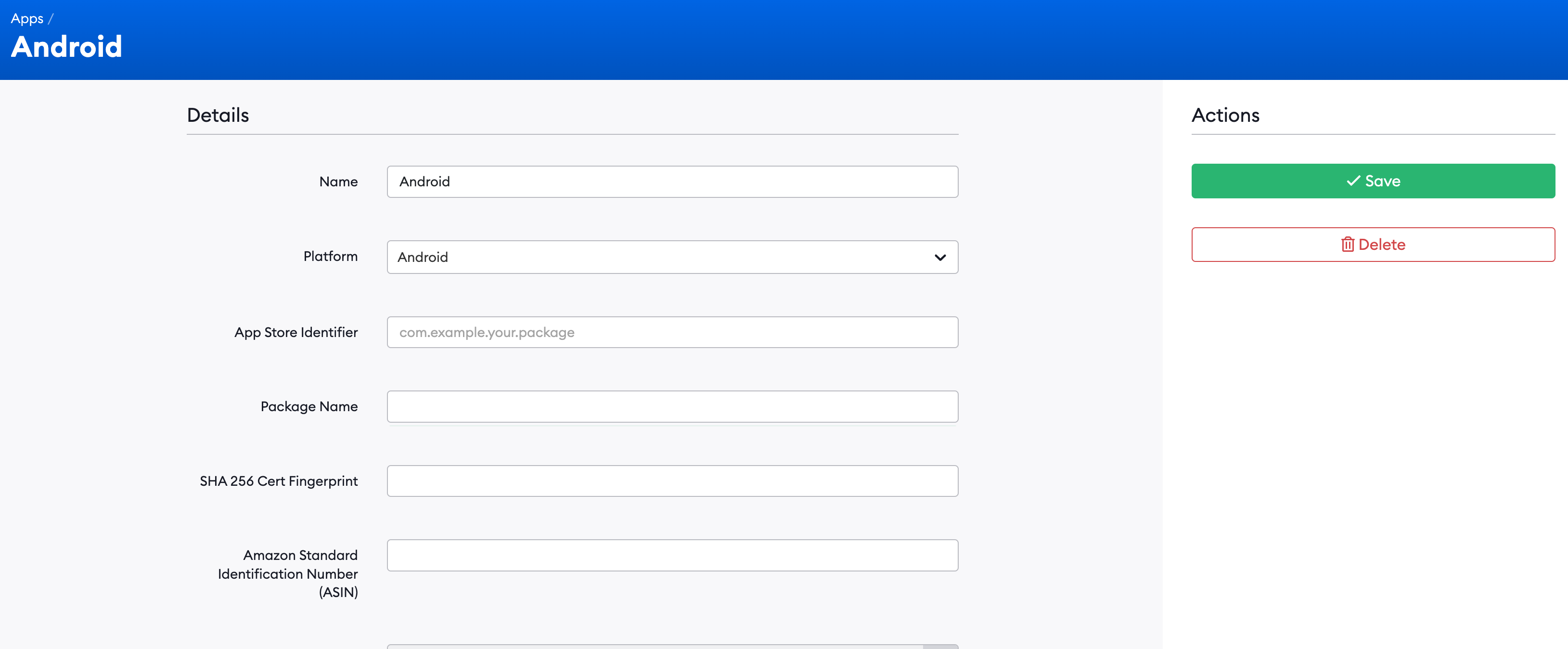
Navigate to the 'Apps' section on the left-hand side
Click on the 'New App' button
Fill out the 'Package Name' and 'SHA 256 Cert Fingerprint'
Package Name - this is the application ID declared in the app's build.gradle file. This value should be the same as the "App Store Identifier" entered above. E.g. com.example.myapp.
SHA 256 Cert Fingerprint - this is the SHA256 fingerprint of your app's signing certificate. You can use the following command to generate the fingerprint via the Java keytool: keytool -list -v -keystore my-release-key.keystore. Or, if using the Google Play Store Signing, the SHA256 signature can be downloaded using the Google Play Console:
Login to the Play Console
Select the app you want to configure
Go to Setup → App integrity
Copy the SHA-256 value under "App signing certificate"
This value should be entered into your Storyteller App's form without the "SHA-256: " prefix. E.g.15:8D:E9:83:C5:73...
After saving your app, the Digital Asset Links file for your tenant can be viewed at the following URLs: https://yourtenantname.ope.nstori.es/assetlinks.json and https://yourtenantname.ope.nstori.es/.well-known/assetlinks.json
Note: the file may take up to 5 minutes to appear after saving your App.
This call makes Storyteller open the provided deep link (showing the requested content). Use Storyteller.isStorytellerDeepLink(url) to check whether a URL is a Storyteller deep link before calling this method.
Parameters:
activity - Activity.
url - this is the Deep Link URL.
onError - called for invalid links, replacement lifecycle/timeout failures, or unavailable Story, Page, Category, Clip Collection, or Clip content. A Sheet fetch failure uses the existing inline Sheet error UI.
When openDeepLink receives a valid Storyteller link while a Story or Clip player is active, the SDK dismisses the active Storyteller presentation before opening the requested content. The replacement dismissal is not animated.
If several valid links arrive while the active presentation is being dismissed, only the latest link opens. Superseded requests are abandoned and do not receive a separate onError callback. Invalid or structurally incomplete links are rejected through onError without dismissing the active player.
Replacement uses one dismissal transaction for Story, Page, Category, Clip Collection, Clip, and Sheet routes. The previous presentation's normal dismissal analytics and onPlayerDismissed() host callback complete once before the requested route starts opening. Sheet routes do not issue a second standalone dismissal.
The supplied Activity must remain available until dismissal finishes. If the Activity finishes or player dismissal cannot be confirmed within the bounded wait, onError is called and the requested content does not open.
Content availability is checked after the previous presentation has been dismissed:
An unavailable Story, Page, Category, Clip Collection, or Clip reports onError; no replacement player opens.
An unavailable Sheet preserves the existing Sheet behavior by showing its inline error and retry UI. It does not call onError for this post-open fetch failure.
For SDK versions before 11.7.0, clients can apply this temporary workaround. Keep the dismissal unconditional because a backgrounded player may not be reflected by Storyteller.isPlayerVisible.
For clip collection deep links, the openDeepLink method identifies and processes links based on the following structure:
A collection-only link contains /open/clips or /go/clips and does not require a Clip ID in the path
A link targeting a specific Clip contains /open/clip/((clipId)) or /go/clip/((clipId))
The link must include a collectionId query parameter
An optional categoryId query parameter can be included to specify a category to open in the Clip Collection as an initial category (initialCategory of the openCollection method)
The information extracted will be used to call openCollection()
It is generally recommended to author your own deep link and extract the required data. This is to not upset the current state and deep link integration of your app and to allow for more control over the deep link handling
then use openStory()/openPage()/openCollection()/openCategory()/openSheet() to pass the relevant data to the SDK, see the Open Player (or AdditionalMethods) documentation for more information.
{"slug": "deep-linking", "page_title": "Deep Linking", "page_url": "DeepLinking/", "canonical_url": "/android/DeepLinking/", "markdown": "# Deep Linking\n\nThe Storyteller SDK makes it possible to handle the deep links. The implementing app should follow the official [Android guideline](https://developer.android.com/training/app-links/deep-linking).\n\n## Showcase examples\n\n- [Compose \u2014 deep link handling (`DeeplinkHandler`)](https://github.com/getstoryteller/storyteller-showcase-android/blob/main/compose/app/src/main/java/com/getstoryteller/storytellershowcaseapp/ui/features/DeeplinkHandler.kt#L40)\n- [XML \u2014 deep link handling (`MainActivity`)](https://github.com/getstoryteller/storyteller-showcase-android/blob/main/xml/app/src/main/java/com/getstoryteller/storytellershowcaseapp/ui/features/MainActivity.kt#L44)\n\nIn order to enable it separate intent filters need to be added to the implementing app's `AndroidManifest.xml`.\n\n```xml\n\n <intent-filter android:autoVerify=\"true\">\n <action android:name=\"android.intent.action.VIEW\" />\n <category android:name=\"android.intent.category.DEFAULT\" />\n <category android:name=\"android.intent.category.BROWSABLE\" />\n\n <data\n android:scheme=\"https\"\n android:host=\"[tenant_name].ope.nstori.es\"\n android:pathPattern=\"/open/.*/.*\" />\n\n <\/intent-filter>\n\n <intent-filter android:autoVerify=\"true\">\n <action android:name=\"android.intent.action.VIEW\" />\n <category android:name=\"android.intent.category.DEFAULT\" />\n <category android:name=\"android.intent.category.BROWSABLE\" />\n\n <data\n android:scheme=\"https\"\n android:host=\"[tenant_name].shar.estori.es\"\n android:pathPattern=\"/go/.*/.*\" />\n <\/intent-filter>\n\n <intent-filter>\n <action android:name=\"android.intent.action.VIEW\" />\n <category android:name=\"android.intent.category.DEFAULT\" />\n <category android:name=\"android.intent.category.BROWSABLE\" />\n\n <data\n android:pathPattern=\"/.*/.*\"\n android:scheme=\"[tenant_name]stories\"\n android:host=\"open\"/>\n <\/intent-filter>\n```\n\nIn the above, `[tenant_name]` is the lower case variant of your tenant's name. For example, if the tenant name is \"MyTenant\", then `[tenant_name]` should be \"mytenant\".\nEach link should be added as a separate intent-filter as in the example above. If Android system starting from Android 11 will fail to auto-verify any of the links which should be auto-verified it will\ndisable the verification for all of them. This will result in the app not being able to handle any of the deep links in the Manifest.\n\n> Note: Please note that the last intent filter above for \"[tenant_name]stories\" does not have android:autoVerify=\"true\" attribute. This is because the auto-verification is not supported for custom non https schemes.\n\nThe deep link can be handled by using `Storyteller.openDeepLink`, which opens the link.\nThis can be done automatically by using `openDeepLink` or manually using Story or Page ID (`openStory` and `openPage` respectively).\n\nExample 1:\n\n```kotlin\noverride fun onCreate(savedInstanceState: Bundle?) {\n super.onCreate(savedInstanceState)\n setContentView(R.layout.main)\n\n val data: Uri = intent?.data ?: return\n val url = data.toString()\n\n if (Storyteller.isStorytellerDeepLink(url)) {\n Storyteller.openDeepLink(this, url) { error ->\n // Handle error (content not found, invalid deep link, etc.)\n }\n }\n}\n```\n\n> Note: Starting from Android 6.0+, a Digital Asset Links file is required to properly handle `https` deep links. It can be generated inside the Storyteller CMS and\n> it requires you to add your app's package name and SHA-256 fingerprint of certificate the app was signed with. For more information on the Digital Asset Links file, see the [Android developer documentation](https://developer.android.com/studio/write/app-link-indexing#associatesite)\n\nTo generate the Digital Asset Links file in the Storyteller CMS:\n\n1. Navigate to the 'Apps' section on the left-hand side\n2. Click on the 'New App' button\n3. Fill out the 'Package Name' and 'SHA 256 Cert Fingerprint'\n\n- Package Name - this is the application ID declared in the app's `build.gradle` file. This value should be the same as the \"App Store Identifier\" entered above. E.g. `com.example.myapp.`\n- SHA 256 Cert Fingerprint - this is the SHA256 fingerprint of your app's signing certificate. You can use the following command to generate the fingerprint via the Java keytool: `keytool -list -v -keystore my-release-key.keystore`. Or, if using the Google Play Store Signing, the SHA256 signature can be downloaded using the Google Play Console:\n + Login to the Play Console\n + Select the app you want to configure\n + Go to Setup \u2192 App integrity\n + Copy the SHA-256 value under \"App signing certificate\"\n + This value should be entered into your Storyteller App's form without the \"SHA-256: \" prefix. E.g.`15:8D:E9:83:C5:73...`\n\n\n\nAfter saving your app, the Digital Asset Links file for your tenant can be viewed at the following URLs: `https://yourtenantname.ope.nstori.es/assetlinks.json` and `https://yourtenantname.ope.nstori.es/.well-known/assetlinks.json`\n\n**Note: the file may take up to 5 minutes to appear after saving your App.**\n\n## Deep Link Handling\n\n### Open Deep Link\n\nThe `openDeepLink` function in the Storyteller SDK handles different types of deep links.\n\n```kotlin\nfun openDeepLink(activity: Activity, url: String, onError: (StorytellerError) -> Unit = {})\n```\n\nThis call makes Storyteller open the provided deep link (showing the requested content). Use `Storyteller.isStorytellerDeepLink(url)` to check whether a URL is a Storyteller deep link before calling this method.\n\nParameters:\n\n- `activity` - Activity.\n\n- `url` - this is the Deep Link URL.\n\n- `onError` - called for invalid links, replacement lifecycle/timeout failures, or unavailable Story, Page, Category, Clip Collection, or Clip content. A Sheet fetch failure uses the existing inline Sheet error UI.\n\n#### Replacing an active player\n\nWhen `openDeepLink` receives a valid Storyteller link while a Story or Clip player is active, the SDK dismisses the active Storyteller presentation before opening the requested content. The replacement dismissal is not animated.\n\nIf several valid links arrive while the active presentation is being dismissed, only the latest link opens. Superseded requests are abandoned and do not receive a separate `onError` callback. Invalid or structurally incomplete links are rejected through `onError` without dismissing the active player.\n\nReplacement uses one dismissal transaction for Story, Page, Category, Clip Collection, Clip, and Sheet routes. The previous presentation's normal dismissal analytics and `onPlayerDismissed()` host callback complete once before the requested route starts opening. Sheet routes do not issue a second standalone dismissal.\n\nThe supplied `Activity` must remain available until dismissal finishes. If the Activity finishes or player dismissal cannot be confirmed within the bounded wait, `onError` is called and the requested content does not open.\n\nContent availability is checked after the previous presentation has been dismissed:\n\n- An unavailable Story, Page, Category, Clip Collection, or Clip reports `onError`; no replacement player opens.\n- An unavailable Sheet preserves the existing Sheet behavior by showing its inline error and retry UI. It does not call `onError` for this post-open fetch failure.\n\nFor SDK versions before `11.7.0`, clients can apply this temporary workaround. Keep the dismissal unconditional because a backgrounded player may not be reflected by `Storyteller.isPlayerVisible`.\n\n```kotlin\nStoryteller.dismissPlayer(animated = false) {\n Storyteller.openDeepLink(this, url, ::handleError)\n}\n```\n\n#### Story Category\n\n- For story category deep links, the openDeepLink method identifies and processes links based on the following structure:\n- The link contains either `/open/category/` or `/go/category/`\n- The link includes a category identifier following the `/category/` part of the path\n- The category ID is extracted from the deep link and the `openCategory` function is called with the extracted category ID\n- eg: `\"https://[tenantname].shar.estori.es/go/category/123456\"` or `\"https://[tenantname].shar.estori.es/open/category/123456\"`\n\n#### Clip collection\n\n- For clip collection deep links, the openDeepLink method identifies and processes links based on the following structure:\n- A collection-only link contains `/open/clips` or `/go/clips` and does not require a Clip ID in the path\n- A link targeting a specific Clip contains `/open/clip/((clipId))` or `/go/clip/((clipId))`\n- The link must include a `collectionId` query parameter\n- An optional `categoryId` query parameter can be included to specify a category to open in the Clip Collection as an initial category (`initialCategory` of the openCollection method)\n- The information extracted will be used to call `openCollection()`\n- Collection eg: `\"https://[tenantname].shar.estori.es/go/clips?collectionId=abcd1234\"`\n- Clip eg: `\"https://[tenantname].shar.estori.es/open/clip/((clipId))?collectionId=abcd1234&categoryId=123456\"`\n\n#### Story Deep link\n\n- For story deep links, the openDeepLink method identifies and processes links based on the following structure:\n- The link is confirmed to be a URI object\n- It extracts storyId or pageId from the deep link via segment positions. One must be present\n- It proceeds to call `openPage()` or `openStory()` with either the storyId or pageId,\n- eg openStory: `https://[tenantname].shar.estori.es/go/story/((storyId))` or openPage: `https://[tenantname].shar.estori.es/go/page/((pageId))`\n\n#### Sheet\n\n- For sheet deep link, the openDeepLink method identifies and processes links based on the following structure:\n- The link contains either `/open/sheet/` or `/go/sheet/`\n- It extracts `sheetId` from the deep link via segment positions. One must be present\n- eg: `\"https://[tenantname].shar.estori.es/go/sheet/123456\"` or\n `\"https://[tenantname].ope.nstori.es/open/sheet/123456\"`\n\n## Manual Deep Link Handling\n\nIt is generally recommended to author your own deep link and extract the required data. This is to not upset the current state and deep link integration of your app and to allow for more control over the deep link handling\nthen use `openStory()`/`openPage()`/`openCollection()`/`openCategory()`/`openSheet()` to pass the relevant data to the SDK, see the [Open Player](OpenPlayer.md) (or [AdditionalMethods](AdditionalMethods.md)) documentation for more information.\n\n### isStorytellerDeepLink\n\n`isStorytellerDeepLink(String)` checks if the string is a valid Storyteller deep link.\n\n```kotlin\nStoryteller.isStorytellerDeepLink(\"stories://open/9329bed2-2311-69b8-cbcf-39fcf8d8af21/f6445df7-bd79-71de-cdfb-39fd071568a1\")\n```\n", "copy_markdown_include_header": false, "base_path": "android", "ai_dir": "ai", "missing_payload_behavior": "empty"}